Using a Surface as a Framework
 1  2-21  22-41  42-51

Previous
Next
 From:  Michael Gibson
10284.42 In reply to 10284.40 
Hi Andy,

re:
> I thought that MoI inhabited the area in between where organic shapes were easily
> created in CAD formats.

That's not too far off but the focus in MoI is on drawing new things from scratch. Generating organic shapes that adhere to scanned triangle mesh data is a different area than that - "reverse engineering". That is not an area that Moi is focused on, it's a big area with specialized tools and workflows and a high learning curve.

It seems that maybe you heard someone mention that you can create organic shapes in MoI using tools like network surface and you are seizing on that word "organic" and expecting that Moi can do anything having to do with any organic shape process at all which is not accurate.

For reverse engineering like you want to do probably Rhino with some of the plugins I linked to above is your best bet. This is a good starting point:
https://wiki.mcneel.com/rhino/reverseengineering

There are automated scan to CAD tools like Geomagic wrap but they're pretty expensive.

The other route that you can go is to do more work in the polygon mesh world like with 3D Coat or ZBrush and either do all the work for preparing your output there or use retopology tools to fit a sub-d mesh to your scan data and then bring over the sub-d surface into the CAD side of things.

MoI may be able to play some part in this process but it is not going to be a tool that does the complete reverse engineering task on its own.

- Michael
  Reply Reply More Options
Post Options
Reply as PM Reply as PM
Print Print
Mark as unread Mark as unread
Relationship Relationship
IP Logged

Previous
Next
 From:  Frenchy Pilou (PILOU)
10284.43 
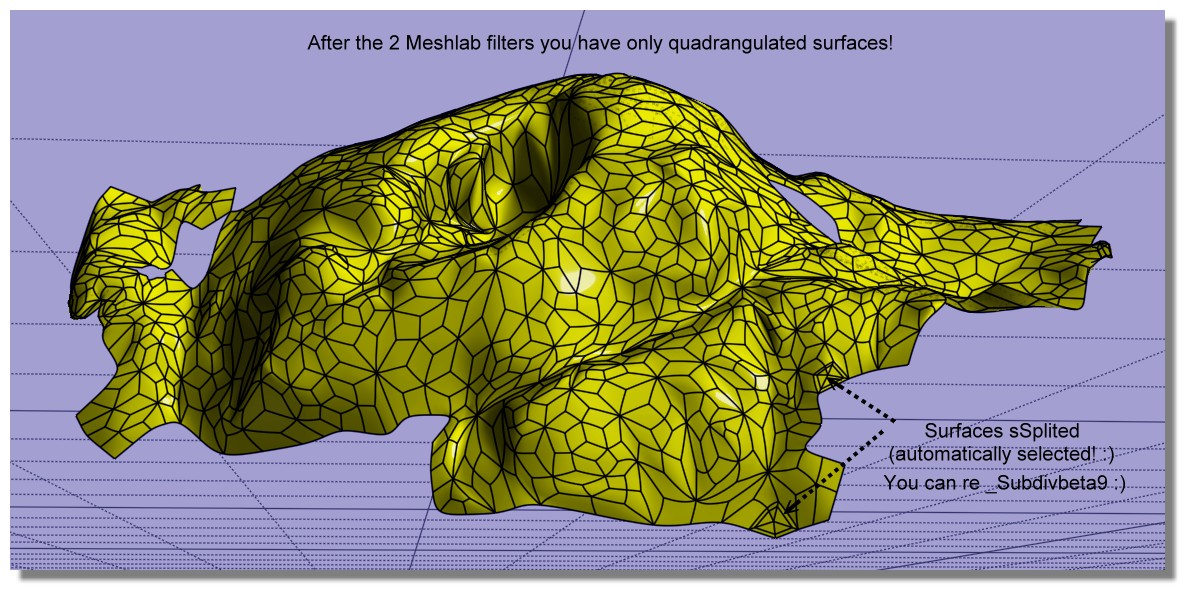
Refining & reduct the process! 7 Steps! :)
- MeshLab
1. Import the file OBJ triangulated
2. Go to Filters -> Remeshing, Simplification and Reconstruction -> Simplification: Quadric Edge Collapse Decimation
3. Enter target of 1000 faces
take the result without exit Meshlab
4 . now again MeshLab : Tri to Quad (4-8 subdivision)
5. Export obj (with enable Convert Triangles to Polygons)
- Moi3D
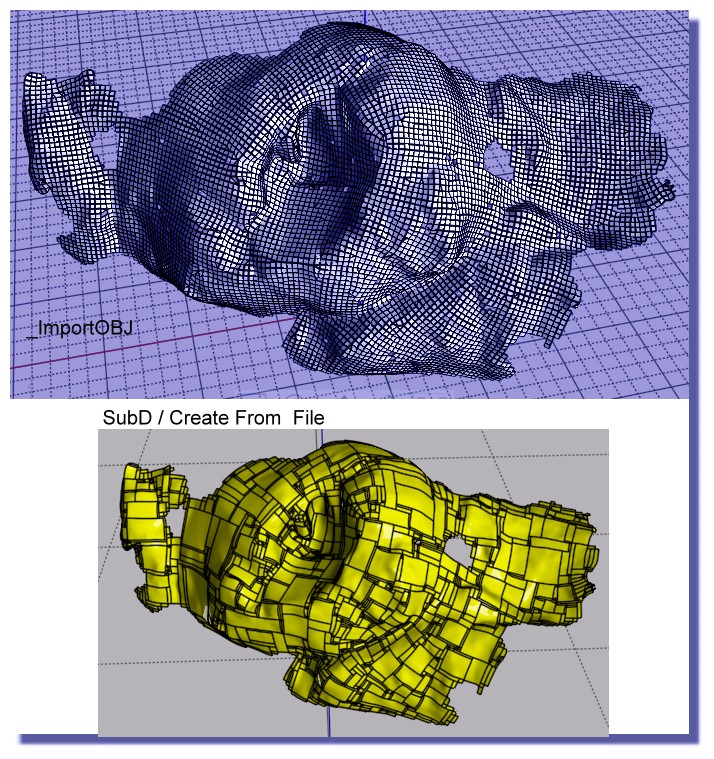
6. In Moi SUbD / Create from File (because _import obj don't work ! )
7. _subdivBeta9 (only 3 surfaces to sSplit automatically selected! )
you have a perfect voluptuous nurbs surface! :) (facets are not planar! )

EDITED: 24 Apr 2021 by PILOU

  Reply Reply More Options
Post Options
Reply as PM Reply as PM
Print Print
Mark as unread Mark as unread
Relationship Relationship
IP Logged

Previous
Next
 From:  Michael Gibson
10284.44 In reply to 10284.43 
Hi Pilou, although your method there does create quads, they are not in a configuration suitable for sub-d smoothing. You've got a large number of "star points" and no long sequences of edge flows like an actual sub-d control cage should be like.

So I would not recommend that route compared to doing actual sub-d focused retopology.

- Michael
  Reply Reply More Options
Post Options
Reply as PM Reply as PM
Print Print
Mark as unread Mark as unread
Relationship Relationship
IP Logged

Previous
Next
 From:  Frenchy Pilou (PILOU)
10284.45 In reply to 10284.44 
That the default! :)
---
Pilou
Is beautiful that please without concept!
My Moi French Site My Gallery My MagicaVoxel Gallery
  Reply Reply More Options
Post Options
Reply as PM Reply as PM
Print Print
Mark as unread Mark as unread
Relationship Relationship
IP Logged

Previous
Next
 From:  Barry-H
10284.46 In reply to 10284.36 
Hi,
have been experimenting with Meshlab and Instant Meshes and got similar results To Burrman.
Maybe of some use.
Cheers
Barry


  Reply Reply More Options
Post Options
Reply as PM Reply as PM
Print Print
Mark as unread Mark as unread
Relationship Relationship
IP Logged

Previous
Next
 From:  Frenchy Pilou (PILOU)
10284.47 In reply to 10284.46 
What is the regulates / Parameters inside Instant Meshes (or Meshlab? ) for have these "Squares triming" ?
  Reply Reply More Options
Post Options
Reply as PM Reply as PM
Print Print
Mark as unread Mark as unread
Relationship Relationship
IP Logged

Previous
Next
 From:  Barry-H
10284.48 In reply to 10284.47 
Hi Pilou,
In Instant Meshes you can adjust the density of the topology.
Instant Meshes didn’t load the original mesh properly so
I used Mesh lab to reduce the original mesh with just Quadric Edge Collapse Decimation.
Then took it into Instant Meshes to create the topology mesh that then can be loaded into Moi.
Cheers
Barry
  Reply Reply More Options
Post Options
Reply as PM Reply as PM
Print Print
Mark as unread Mark as unread
Relationship Relationship
IP Logged

Previous
Next
 From:  Frenchy Pilou (PILOU)
10284.49 In reply to 10284.48 
Ok..the Key was your Quadrige decimation only in Meshlab then Instant Meshes! :)

---
Pilou
Is beautiful that please without concept!
My Moi French Site My Gallery My MagicaVoxel Gallery
  Reply Reply More Options
Post Options
Reply as PM Reply as PM
Print Print
Mark as unread Mark as unread
Relationship Relationship
IP Logged

Previous
Next
 From:  Andy (ANDYA)
10284.50 In reply to 10284.46 
Barry - how are you cutting off those pieces from the surface? Thanks, Andy
  Reply Reply More Options
Post Options
Reply as PM Reply as PM
Print Print
Mark as unread Mark as unread
Relationship Relationship
IP Logged

Previous
 From:  Barry-H
10284.51 In reply to 10284.50 
Hi Andy,
I offset the surface then trim inner and outer surfaces.
Then selected naked edges of the trimmed surfaces.
Apply join command this creates 2 curves I then rebuild them.
Loft these curves and join to trimmed surfaces thus creating a solid.
If you need more detail let me know.
Cheers
Barry
  Reply Reply More Options
Post Options
Reply as PM Reply as PM
Print Print
Mark as unread Mark as unread
Relationship Relationship
IP Logged
 

Reply to All Reply to All


Show messages:  1  2-21  22-41  42-51