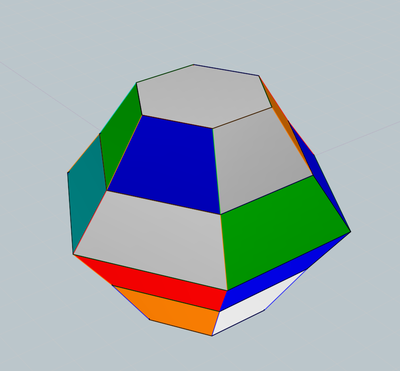
How to Randomly assign specified colors from Styles to faces & edges ?
All  1-3  4-7

Previous
Next
 From:  Frenchy Pilou (PILOU)
10222.4 In reply to 10222.3 
Sure but inside this one you can see how select your colors...
so maybe a mix is possible...
---
Pilou
Is beautiful that please without concept!
My Moi French Site My Gallery My MagicaVoxel Gallery
  Reply Reply More Options
Post Options
Reply as PM Reply as PM
Print Print
Mark as unread Mark as unread
Relationship Relationship
IP Logged

Previous
Next
 From:  bemfarmer
10222.5 In reply to 10222.1 
Hi Ed,
It should be possible to select a random style from a more or less sequential set of styleIndex values.
In the ModulationTest2 script that Michael helped me with several years ago, the function AssignColors was used. It would have to be randomized over the desired range of style indexes. Generate a random number between 0 and 6, and add it to the beginning of your selected range of styles....
Apply and repeat...

- Brian
  Reply Reply More Options
Post Options
Reply as PM Reply as PM
Print Print
Mark as unread Mark as unread
Relationship Relationship
IP Logged

Previous
Next
 From:  Michael Gibson
10222.6 In reply to 10222.1 
Hi Ed,

re:
> But is there a way to specify just a subset of colors from the Styles?

So the code that generates the style index is this part here (it's in 2 places in the script one for where it sets up edges and another faces):

styleIndex = Math.floor(Math.random() * styles.length);

If you wanted it to choose only from the first 10 styles, you could do it like this instead:

styleIndex = Math.floor(Math.random() * 10);

If you wanted it to choose from the last 10 styles, you could do it like this:

styleIndex = styles.length - 1 - Math.floor(Math.random() * 10);

- Michael
  Reply Reply More Options
Post Options
Reply as PM Reply as PM
Print Print
Mark as unread Mark as unread
Relationship Relationship
IP Logged

Previous
 From:  ed (EDDYF)
10222.7 In reply to 10222.6 
Thanks Michael!

Tested here using first 6 default colors in Styles list.

script: /* Assign random styles to faces and edges */ var styles = moi.geometryDatabase.getObjectStyles(); var breps = moi.geometryDatabase.getObjects().getBReps(); for ( var i = 0; i < breps.length; ++i )
{ var brep = breps.item(i); var edges = brep.getEdges(); for ( var j = 0; j < edges.length; ++j ) { edges.item(j).styleIndex = Math.floor(Math.random() * 6); } var faces = brep.getFaces();
for ( var j = 0; j < faces.length; ++j ) { faces.item(j).styleIndex = Math.floor(Math.random() * 6); } }


Ed Ferguson
  Reply Reply More Options
Post Options
Reply as PM Reply as PM
Print Print
Mark as unread Mark as unread
Relationship Relationship
IP Logged
 

Reply to All Reply to All


Show messages: All  1-3  4-7