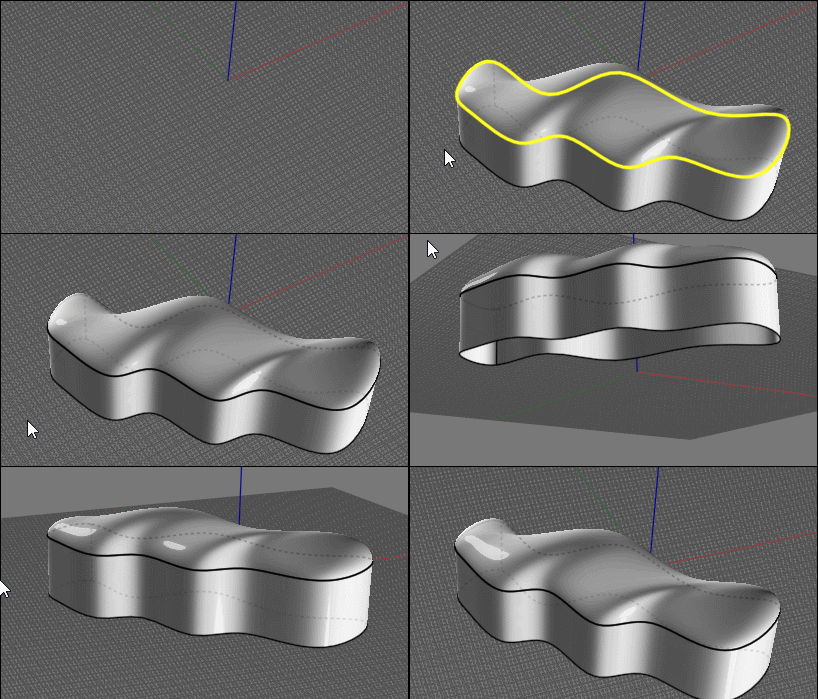
Fabric seat
 1  2-21  22-30

Previous
Next
 From:  Phiro
10073.22 
Yes, before revolving, you have to rebuild your curves to avoid the multiples edges if your original curves were with hard points.
  Reply Reply More Options
Post Options
Reply as PM Reply as PM
Print Print
Mark as unread Mark as unread
Relationship Relationship
IP Logged

Previous
Next
 From:  bemfarmer
10073.23 
So I read that these are called "wrinkles".
For vinyl, they steam them, to reduce them.

The number of points in the iso-curves has an effect on the DistortCurves script?
Rebuild can add points. Higher tolerance, more points?

- Brian
  Reply Reply More Options
Post Options
Reply as PM Reply as PM
Print Print
Mark as unread Mark as unread
Relationship Relationship
IP Logged

Previous
Next
 From:  Tony77
10073.24 In reply to 10073.21 
Ok everything clear .... only the last step is not clear to me .... from the loft onwards .... forgive me but I'm translating using an online translator and the last step is not clear

I got up to here:
Image Attachments:
Size: 155.7 KB, Downloaded: 33 times, Dimensions: 1167x964px
  Reply Reply More Options
Post Options
Reply as PM Reply as PM
Print Print
Mark as unread Mark as unread
Relationship Relationship
IP Logged

Previous
Next
 From:  Frenchy Pilou (PILOU)
10073.25 In reply to 10073.24 
Cool result Phiro

For an ultima perfect result the "boundaring tube" should be also a little perturbated! ;)

@Tony

I believe that you must maybe have the same number of "Points" when you "Rebuild" your curve(s)

Like this even each curve is tortured crease will be more aligned and less disparated than in your case!

PS The distort curves thread by Max Smirnov
http://moi3d.com/forum/index.php?webtag=MOI&msg=6659.13

Else Blend method from a Subdivided box


For make a Blend each edges selected must be belong to a surface!
(so some tricky process :)!


EDITED: 21 Dec 2020 by PILOU

  Reply Reply More Options
Post Options
Reply as PM Reply as PM
Print Print
Mark as unread Mark as unread
Relationship Relationship
IP Logged

Previous
Next
 From:  Phiro
10073.26 
@Tony

On your last picture, I think you have 2 surfaces, green and white.
The white is useless.

I apply the "blendcap" script (http://moi3d.com/forum/index.php?webtag=MOI&msg=7370.6) with the internal edge of lofted surface.


  Reply Reply More Options
Post Options
Reply as PM Reply as PM
Print Print
Mark as unread Mark as unread
Relationship Relationship
IP Logged

Previous
Next
 From:  Frenchy Pilou (PILOU)
10073.27 
Don't remember this cool "Blend Cap"!

Just need a "wall" else don't success!

EDITED: 21 Dec 2020 by PILOU

  Reply Reply More Options
Post Options
Reply as PM Reply as PM
Print Print
Mark as unread Mark as unread
Relationship Relationship
IP Logged

Previous
Next
 From:  Tony77
10073.28 In reply to 10073.27 
@Phiro

Thanks, I had guessed that it was a script ..... initially I thought it was a Blend applied to a simple surface .... that's why I didn't understand.

Thanks again ;)
  Reply Reply More Options
Post Options
Reply as PM Reply as PM
Print Print
Mark as unread Mark as unread
Relationship Relationship
IP Logged

Previous
Next
 From:  Tony77
10073.29 In reply to 10073.25 
@Phiro

Can you confirm that this is the effect of the blendcap? ... or did I miss some steps?
Image Attachments:
Size: 156.4 KB, Downloaded: 34 times, Dimensions: 1266x890px
  Reply Reply More Options
Post Options
Reply as PM Reply as PM
Print Print
Mark as unread Mark as unread
Relationship Relationship
IP Logged

Previous
 From:  Phiro
10073.30 
@Tony,

I think that this effect is due to lofting.
I use the option to have a "loose" loft and my two orange curves are coplanar so the blendcap is only a plan.

Warning...
There is a small warning with the blendcap script.
This script "cut" the edge to do its surface, so after doing blendcap, your original edge is cutted.
  Reply Reply More Options
Post Options
Reply as PM Reply as PM
Print Print
Mark as unread Mark as unread
Relationship Relationship
IP Logged
 

Reply to All Reply to All


Show messages:  1  2-21  22-30