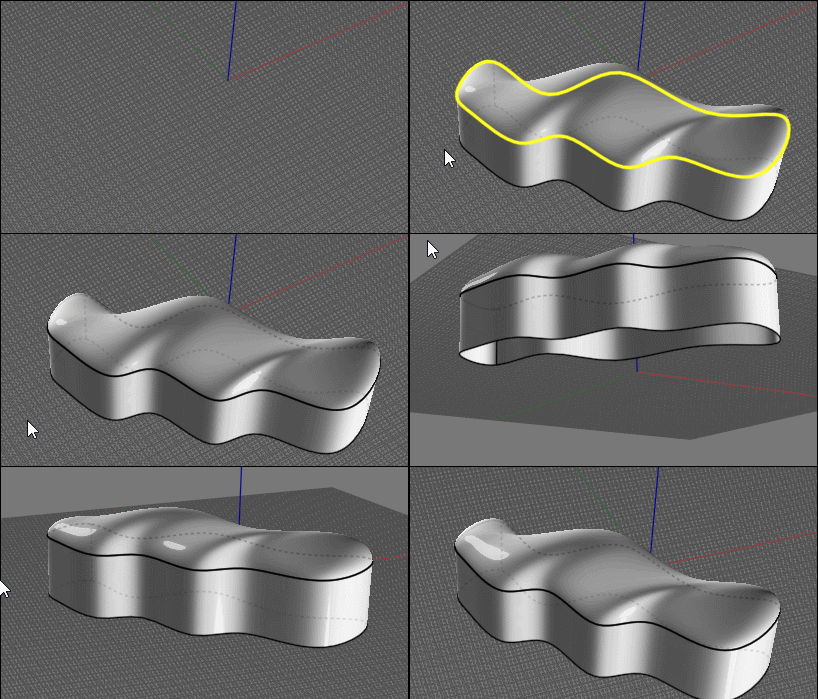
Fabric seat
 1-13  14-30

Previous
Next
 From:  Phiro
10073.14 
I tested a process.
A possible way to do what you want.
You can have creases in all directions with this method.

First, I did a cushion. I took a revolve by rail choice.


Next I took 3 iso curves to extract zones where we will do creases.
I used script DistortCuvresRebuild to do creases only with Z dimension (red curve).
I used the same script to have a non regular zone where creases will disapear but only with X and Y distortions (orange curve).
The third iso is green to have a base of the side of cushion.

I use loft/loose to create creases with the 3 curves I had now.
Then I fix the jointure to have a solid by blending surfaces (creating the blue curve by cloning orange to cut the plane before blending).


I add a small border too.


You could do better with small adjustments, I think.

  Reply Reply More Options
Post Options
Reply as PM Reply as PM
Print Print
Mark as unread Mark as unread
Relationship Relationship
IP Logged

Previous
Next
 From:  bemfarmer
10073.15 In reply to 10073.14 
Looks good Philo.

Please correct me if I am wrong:

The red, orange, and blue curves began life as "smooth" iso-curves of the cushion.
They are concentric, due to the revolve rail used to create the cushion.
( The red curve began as the green curve, to which z distortions was done. )
The parent curve of the orange curve had xy distortion applied to it.
Similarly for the blue curve. Wonder why the blue curve appears to be a scaled down version of the orange curve?

- Brian
  Reply Reply More Options
Post Options
Reply as PM Reply as PM
Print Print
Mark as unread Mark as unread
Relationship Relationship
IP Logged

Previous
Next
 From:  Tony77
10073.16 In reply to 10073.14 
Thanks Phiro

could you kindly explain me the speech of the iso curves? ... do you extract them from the model or build them directly?

I didn't understand the whole process .... it's definitely what I need
  Reply Reply More Options
Post Options
Reply as PM Reply as PM
Print Print
Mark as unread Mark as unread
Relationship Relationship
IP Logged

Previous
Next
 From:  Phiro
10073.17 In reply to 10073.15 
You're globaly right Brian.

The green, red and orange curves began life as "smooth" iso-curves of the cushion.

Yes, they are concentric because of the revolve rail used to construct the cushion.

The red curve is an iso as is the green an another iso.
The red one has a z distortion

Yes, the Orange is an iso with a XY distortion applied.

But the blue is a clone of the orange with a scale (the cause of the similarity). I made the blue because when I did the lofting I didn't have sufaces which could be joined as solid.
Blue is used to cut the flat top before doing a blending.
The blending gave me a surface to join and have a solid.

I always do solids because I always do models for 3dprinting.
But for a illustration it's not so important... or useless.

I don't remember when I add rebuild or reconstructcurve, but I do it often to smooth or delete the hard angles.


Have a fun Moment Of Inspiration !

Francois
  Reply Reply More Options
Post Options
Reply as PM Reply as PM
Print Print
Mark as unread Mark as unread
Relationship Relationship
IP Logged

Previous
Next
 From:  Phiro
10073.18 
Sorry Tony,

I will detail the process.
My first post was not detailled and I forgot steps...
  Reply Reply More Options
Post Options
Reply as PM Reply as PM
Print Print
Mark as unread Mark as unread
Relationship Relationship
IP Logged

Previous
Next
 From:  Tony77
10073.19 In reply to 10073.18 
But don't worry ... it was just to understand better :)
  Reply Reply More Options
Post Options
Reply as PM Reply as PM
Print Print
Mark as unread Mark as unread
Relationship Relationship
IP Logged

Previous
Next
 From:  Phiro
10073.20 
Ok I redo step by step but I don't remember well... so I do a new process too.


I do a revolve with rail to have a single surface and have next simple iso curves.


I do 3 iso curves orange red and green


I used the "DistortCurvesRebuid" script.
The orange one is distorted on X and Y. You can rescale if the waves created are too big.

I have trimed the cushion with iso curves before deleting the useless border (and top) we will recreate with creases.

The red curves is Z distorted to have some waves for the creases. You can rescale on Z to have more amplitude on creases.


Verify if you have closed curves red orange and green
I duplicate and rescale to have another orange smaller

You can now do the lofting (with loose loft to have smooth loft). orange, orange, red and green. (don't cap your loft).


Next, i can "blendcap" to redo a the top with the closed edge created by loft.

You can join surfaces to have a solid.

You can border the edge with a sweeped circle.


I hope to have been more clear with this version.

  Reply Reply More Options
Post Options
Reply as PM Reply as PM
Print Print
Mark as unread Mark as unread
Relationship Relationship
IP Logged

Previous
Next
 From:  Tony77
10073.21 In reply to 10073.20 
Yes, of course .... it was clear even before ..... obviously I'm the one who's wrong.

The only doubt is in the passage of the revolve rail evidently I create a wrong curve because to me the "cushion" comes out like this.
Image Attachments:
Size: 121.7 KB, Downloaded: 16 times, Dimensions: 1105x908px
  Reply Reply More Options
Post Options
Reply as PM Reply as PM
Print Print
Mark as unread Mark as unread
Relationship Relationship
IP Logged

Previous
Next
 From:  Phiro
10073.22 
Yes, before revolving, you have to rebuild your curves to avoid the multiples edges if your original curves were with hard points.
  Reply Reply More Options
Post Options
Reply as PM Reply as PM
Print Print
Mark as unread Mark as unread
Relationship Relationship
IP Logged

Previous
Next
 From:  bemfarmer
10073.23 
So I read that these are called "wrinkles".
For vinyl, they steam them, to reduce them.

The number of points in the iso-curves has an effect on the DistortCurves script?
Rebuild can add points. Higher tolerance, more points?

- Brian
  Reply Reply More Options
Post Options
Reply as PM Reply as PM
Print Print
Mark as unread Mark as unread
Relationship Relationship
IP Logged

Previous
Next
 From:  Tony77
10073.24 In reply to 10073.21 
Ok everything clear .... only the last step is not clear to me .... from the loft onwards .... forgive me but I'm translating using an online translator and the last step is not clear

I got up to here:
Image Attachments:
Size: 155.7 KB, Downloaded: 33 times, Dimensions: 1167x964px
  Reply Reply More Options
Post Options
Reply as PM Reply as PM
Print Print
Mark as unread Mark as unread
Relationship Relationship
IP Logged

Previous
Next
 From:  Frenchy Pilou (PILOU)
10073.25 In reply to 10073.24 
Cool result Phiro

For an ultima perfect result the "boundaring tube" should be also a little perturbated! ;)

@Tony

I believe that you must maybe have the same number of "Points" when you "Rebuild" your curve(s)

Like this even each curve is tortured crease will be more aligned and less disparated than in your case!

PS The distort curves thread by Max Smirnov
http://moi3d.com/forum/index.php?webtag=MOI&msg=6659.13

Else Blend method from a Subdivided box


For make a Blend each edges selected must be belong to a surface!
(so some tricky process :)!


EDITED: 21 Dec 2020 by PILOU

  Reply Reply More Options
Post Options
Reply as PM Reply as PM
Print Print
Mark as unread Mark as unread
Relationship Relationship
IP Logged

Previous
Next
 From:  Phiro
10073.26 
@Tony

On your last picture, I think you have 2 surfaces, green and white.
The white is useless.

I apply the "blendcap" script (http://moi3d.com/forum/index.php?webtag=MOI&msg=7370.6) with the internal edge of lofted surface.


  Reply Reply More Options
Post Options
Reply as PM Reply as PM
Print Print
Mark as unread Mark as unread
Relationship Relationship
IP Logged

Previous
Next
 From:  Frenchy Pilou (PILOU)
10073.27 
Don't remember this cool "Blend Cap"!

Just need a "wall" else don't success!

EDITED: 21 Dec 2020 by PILOU

  Reply Reply More Options
Post Options
Reply as PM Reply as PM
Print Print
Mark as unread Mark as unread
Relationship Relationship
IP Logged

Previous
Next
 From:  Tony77
10073.28 In reply to 10073.27 
@Phiro

Thanks, I had guessed that it was a script ..... initially I thought it was a Blend applied to a simple surface .... that's why I didn't understand.

Thanks again ;)
  Reply Reply More Options
Post Options
Reply as PM Reply as PM
Print Print
Mark as unread Mark as unread
Relationship Relationship
IP Logged

Previous
Next
 From:  Tony77
10073.29 In reply to 10073.25 
@Phiro

Can you confirm that this is the effect of the blendcap? ... or did I miss some steps?
Image Attachments:
Size: 156.4 KB, Downloaded: 34 times, Dimensions: 1266x890px
  Reply Reply More Options
Post Options
Reply as PM Reply as PM
Print Print
Mark as unread Mark as unread
Relationship Relationship
IP Logged

Previous
 From:  Phiro
10073.30 
@Tony,

I think that this effect is due to lofting.
I use the option to have a "loose" loft and my two orange curves are coplanar so the blendcap is only a plan.

Warning...
There is a small warning with the blendcap script.
This script "cut" the edge to do its surface, so after doing blendcap, your original edge is cutted.
  Reply Reply More Options
Post Options
Reply as PM Reply as PM
Print Print
Mark as unread Mark as unread
Relationship Relationship
IP Logged
 

Reply to All Reply to All


Show messages:  1-13  14-30