Show messages:
1-17
…
318-337
338-357
358-377
378-397
398-417
418-437
438-442
From: FelixPQ (FELIX)
Michael,
yes again, retopo is the route one as to take now and there are good tools for doing just that out there. You'll probably agree with me that an even better route would be to start directly our work with a SubD program and bypass completely the retopo and or conversion phase. IMHO it would be much more efficient.
Out of curiosity, to your knowledge, is the route from SubD to NURBS somewhat more efficient? I just love using MOI and I'd like for example to be able to add a part made as a mesh from the start, say the "flowers" I made earlier to a mirror frame made in MOI. I already know I could convert the mesh to a heightmap and use ZSurf to get a Nurbs surface. Though it would probably work fine, it's not what I would call an efficient route.
Thanks,
Felix
From: Michael Gibson
Hi Felix,
> Out of curiosity, to your knowledge, is the route from SubD to NURBS
> somewhat more efficient?
It is, but going in that direction is a relatively new area of tech and it's not very common yet.
But there are 2 tools that can move things in that direction - either the T-Splines plug-in for Rhino (
http://www.tsplines.com/) or the Power SubD-NURBS plugin for Modo (
http://www.luxology.com/store/Power_SubD-NURBS/) can convert a SubD control cage to smoothed NURBS surfaces.
- Michael
From: FelixPQ (FELIX)
Michael,
thanks for the info. TSplines seems awsome at first glance, it looks like it brings the best of both WORLD into a single uniform environment. I kind of like that approach. As for Power SubD-Nurbs, it seems more like a mean to translate SubD to Nurbs which is nice as well. Different approach and workflow, I guess it's a question of personal preferences.
Thanks again,
Felix
From: Mike K4ICY (MAJIKMIKE)
Oh the requests... they just keep on coming!!! ;-)
Have a very happy 4th of July Michael!
I thought I'd enhance my request for the Array by Rotation tool:
Not only could you choose the axis of rotation in 3d space, (while in 3D view too)
but you could also move both the axis point(s) and original object while the dialog is still up and you have yet to hit the "done" button.
This way, one would not have to hit cancel so many times just to reposition the object or axis before rotating.
From: eric (ERICCLOUGH)
Hi Michael ...
I would like to see a feature like Sketchup's 'section plane' ... it works line a boolean difference through an object but is not a permanent change and can be easily moved backward and forward fluidly.
It may be fairly simple but I can understand that it might be a hugely complicated bit of programming.
cheers,
eric
From: wireframeX
Workplane is the first thing I need for now
From: Michael Gibson
Hi wireframeX,
> Workplane is the first thing I need for now
Check out the Construction Plane tool under View > CPlane, more info here:
http://moi3d.com/2.0/docs/moi_command_reference5.htm#cplane
- Michael
From: Frenchy Pilou (PILOU)
Does exist a whish list for the V3 like this one ?
http://moi3d.com/wiki/Wishlist
From: Michael Gibson
Hi Pilou,
> Does exist a whish list for the V3 like this one ?
>
http://moi3d.com/wiki/Wishlist
I've just been using this particular thread in the forum as the V3 wishlist.
- Michael
From: wireframeX
Wow thanks !!!
Didn't view it ....
From: gbing
Hi Michael,
I'm also interested to a function similar to "section plane" of SketchUp.
In Rhino a similar function is "clipping plane" and you can define as many clipping planes as you need defining also thickness and colour of the section border with the possibility to have or not a filled cap (if the volume clipped is a solid). In other SW you can define also clipping volumes.
For complex structures, AEC, and assemblies it is a feature really important.
Thanks,
Giovanni
P.S. In sketchup a minus of "section plane" is that you can have only one section plane active (there are workarounds using groups or components but the workflow is not so easy)
From: Frenchy Pilou (PILOU)
<< P.S. In sketchup a minus of "section plane" is that you can have only one section plane active (there are workarounds using groups or components but the workflow is not so easy)
What is difficult in this? ;)
From: eric (ERICCLOUGH)
Hi Michael ...
Another one I would like: Styles ... I would like to be able to drag and drop a style into a new location. I know I can do this with the up and down but now that I have added many colors I have many, many styles and it is slow and difficult to add one and not relocate it by alphabetizing (all my colors are now at the bottom of the list and I want to leave them there ... yes, I could rename them to start with z but this is a big job). another assist would be a 'match' option so I could assign these new colors to new names more easily.
cheers
eric
From: gbing
Hi Pilou,
my previous note wasn't clear!
<< P.S. In sketchup a minus of "section plane" is that you can have only one section plane active (there are workarounds using groups or components but the workflow is not so easy)>>
I meant ... you can have only one section plane active at the same time!!
Here an example from Rhino:
3D model with 2 clipping planes INACTIVE:

3D model with clipping plane 1 ACTIVE:

3D model with clipping plane 2 ACTIVE:

3D model with clipping plane 1 and 2 ACTIVE at the same time:

Image Attachments:
 Cattura1.jpg
Cattura2.jpg
Cattura3.jpg
Cattura4.jpg
Cattura1.jpg
Cattura2.jpg
Cattura3.jpg
Cattura4.jpg
From: Frenchy Pilou (PILOU)
More infos ;)
So yes not excatly the same system :)


Else you have also this Cool plug Zorro2 by Whaat
Of course you must all explode before but you will have any number of Slice sections ;)
From: Dan_E10
It's been quite a while since I played with older versions of Moi3d. It seems some kind of N-sided patch or blend between more than 2 edges has been a want for a while. Is this already in or planned for the v3 beta?
thanks,
Dan
From: Michael Gibson
Hi Dan,
> It seems some kind of N-sided patch or blend between more than 2 edges has been
> a want for a while. Is this already in or planned for the v3 beta?
These are not in yet but I am definitely trying to target them for v3. I've put in a fair amount of research time into N-sided blend already but it is a finicky area and I do not yet have anything that gives good enough results yet.
- Michael
From: blowlamp
Michael.
> These are not in yet but I am definitely trying to target them for v3. I've put in a fair amount of research time into N-sided blend already but it is a finicky area and I do not yet have anything that gives good enough results yet.
So if Solids++ doesn't get updated fairly soon, where does this leave things?
It sounds like too big a task for just one person to take on (you) :) and it seems to me that the only other option would appear to be a change of kernel within MoI, or is there some other way to get around this?
Martin (2).
From: Michael Gibson
Hi Martin, there is some work currently in progress in this particular area by Solids++, but I'm waiting for bug fixes to it before I'll know whether it's going to work well enough or not.
If it doesn't work well enough then I'll probably work on developing my own. That's not impossible, just quite a bit of work.
- Michael
From: Mike K4ICY (MAJIKMIKE)
Hi Michael!
I'm not sure I asked for this request before:
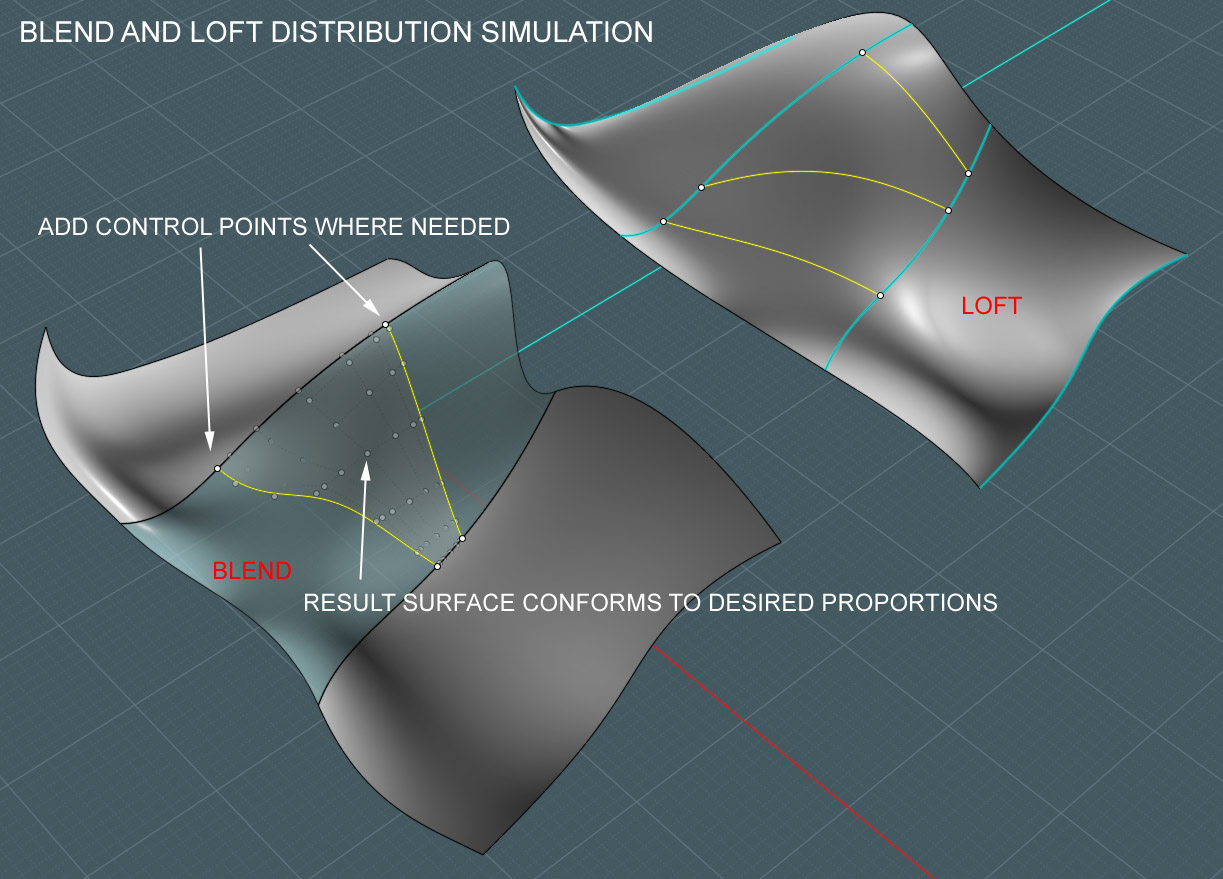
You know how you can control the 'start position' of a Blend or a Loft surface if they are made between closed surface edges.
I run into the need for this often, especially on more complex shapes. And by complex, I mean sometimes a simple bend.
I say to myself: First, wouldn't it be nice to be able to control some point in the middle of a Blend or Loft result surface - on an open surface?
And second, wouldn't it be nice to say, add any amount of control to-and-from points along each edge to tweak the result a little more?
This may already be part of your plans to add things like dual-bulge control and whatnot to Blends.
I think I saw a guy add this extra control to a blend or loft in a Rhino tutorial one time - and I did a double-take and thought "what the heck did he just do?".
This would have good uses... say a particular lumpy area or bump wants to appear but the rest of the Blend looks great... add a little tweaking point-set (like on the closed surface Blends) and thus a little control on the result. :-)
It's okay with me if this goes somewhere deep in the suggestion box. Because I'd still like to see Blending between edges made up of multiple (separate, but joined) surface edges, and that dual or Blend-bulge control thing...
Okay... idea done.
BTW, if I have time, I'd like to make this WIP my next tutorial: :-)
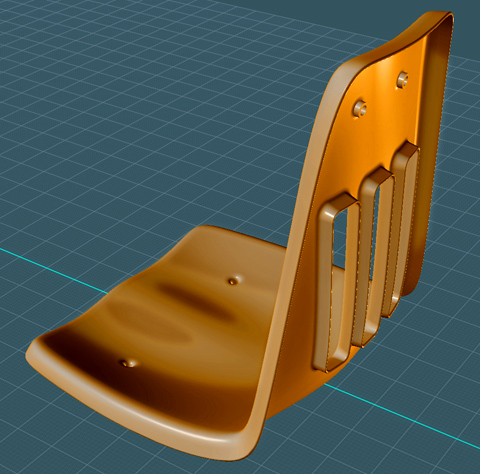
A plastic institution chair, but it's more subtly complex than it looks.
Show messages:
1-17
…
318-337
338-357
358-377
378-397
398-417
418-437
438-442

