Show messages:
1-9
…
210-229
230-249
250-269
270-289
290-309
310-329
330-349
…
430-442
From: BurrMan
Hi Lejan,
Can you give me an example of how you would use the 'golden ratio' in artistry? It appears to be a math point of distribution. How would an artist know/need to use this intuitvly? Is it something taught to artists to use (maybe during setup or something) to do scene/figure scaling by eye or hand? I wanted to understand it's purpose.
Thanks
From: Lejan (JAN)
Hi BurrMan,
even though the definition of the 'golden ratio' is mathematic, it surly reflects certain principles of proportion found in nature.
Depending on your personal understanding of artistry, in mine, one of the main aime is to be 'pleasant' to many beholder.
So if you are in the process of 'composing' art or design you could certanly use principles which have proven valid for some
while to be seen as 'pretty' for many. Those principles can be found in nature, as we are part of and therefore influenced by it.
Symmetry, asymmetry, coloration, shape - you name it - can be found within nature and many of those are quite appealing
to most people.
By using such principles within artistry or design is certainly no guarantee that the outcome will be outstanding, yet it may help
to avoid total failure in some ways. Again, all of this depends on ones taste and liking, so there is not much to argue about if
such applied rules is good or not. In my eyes it definitely is a good point of orientation and to start from, yet it schould not supress
any other ideas possible.
The 'golden ratio' is also taught to artists, designers, architects as one way of harmonic subdivision of length, area and volume
and can be found in artwork and architecture of the past and at present.
If you are interested, you can find some examples in which it was used here:
http://jwilson.coe.uga.edu/EMT668/EMAT6680.2000/Obara/Emat6690/Golden%20Ratio/golden.html
Very famous in using the 'golden ratio' is Leonardo Da Vinci who also sketched the proportions of an human body which became
quite popular even today. Also in his well known painting 'Mona Lisa' this rule can be found, but again, this is not the reason for
the success of this picture, it just became, cleverly used, a part of it.
Image Attachments:
 Image161.jpg
image48.gif
Image161.jpg
image48.gif
From: BurrMan
Thanks Lejan for the response.
"a proportional setup" method (Basically)
I have bookmarked this for myself. :)
From: Michael Gibson
Hi Jan - re: Golden ratio snap - that's definitely an interesting idea. The problem I see in your example image is that there is a kind of implicit orientation used in your snap there:

The orientation meaning that you've decided that the left-hand side of the line is the "start" and the right-hand side is the "end", and that the golden ratio spot should be placed just on the side towards the end I guess?
This kind of orientation dependency is somewhat problematic because I'm not sure what to do with lines at any arbitrary rotation for example - other snaps on to curves do not have that kind of orientation dependency on them so that could be a problem.
Another issue is that it's not necessarily good to have too many snaps that are automatically on all the time because snaps tend to prevent the free placement of points in a nearby zone to the snap. So this might be something that I would think more of targeting as a plug-in tool that you could activate with a specific shortcut key rather than being an additional totally built in snap.
Anyway, those are a couple of issues involved...
- Michael
From: Frenchy Pilou (PILOU)
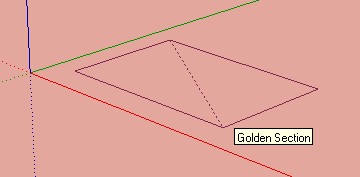
In Sketchup you have this snap but only for the rectangle during its drawing : maybe sufficient for the Golden number ?
Or can be also added during the "Helper line" in Moi ? (similar of the Middle Snap Line first level) ;)
A very artistic esoteric snap :)
Drawn in Moi ;)
This is this rectangle : Red square on the left - Side turned-down from the middle of the side's red square --> gives the new side on the right = Golden Rectangle
(Big side + Little side) / Big side = Golden Number = 1,618 033 988 7....

From: Michael Gibson
Hi Pilou,
> In Sketchup you have this snap but only for the rectangle during its
> drawing : maybe sufficient for the Golden number ?
In MoI you can set up the same thing - add a shortcut key (maybe for letter G for golden snap?) and for the command part paste in the following script:
script: /* Activate golden rectangle snap */ var pp = moi.ui.getActivePointPicker(); if ( pp ) { pp.clearStraightSnapAngles(); pp.addStraightSnapAngle( Math.atan2( 1, (1 + Math.sqrt(5))/2 ) * 180/Math.PI, 'Golden' ); }
Then when you are drawing a rectangle, after you have placed the corner point hit the G key if you want a golden rectangle and you should get a snap line like so:

Note that it will only work correctly if you go from lower left to upper-right drawing direction and not if you go from right to left.
- Michael
Image Attachments:
golden_rectangle_snap.jpg
From: Frenchy Pilou (PILOU)
< In MoI you can set up the same thing
Cool !
That was speedy! :)
About the Helper lines for a line between the 2 red points: Line = 2 segments A & B
2 green points possible for a Golden division (Line A+B or line B+A)

From: Frenchy Pilou (PILOU)
< Note that it will only work correctly if you go from lower left to upper-right drawing direction and not if you go from right to left.
Seems that works in any direction :)
Click the first point of the Rectangle
Call the script
Works like a charm! :)
Each rectangle were drawn from the center so in any direction

Edit Ah yes you have the snaping but not the Golden good result !
So draw from lower left to upper-right and Rotate as wanted :)
From: Marc (TELLIER)
""""""""In MoI you can set up the same thing - add a shortcut key (maybe for letter G for golden snap?) and for the command part paste in the following script:"""""""""""
Wow a Fibonacci snap!
This is very cool, Thanks Michael.
Marc
From: Lejan (JAN)
Hi Michael,
your comment about my drawn example is right, as it shows only one of the two possible golden snap points
on this line. But it was Photoshopped to visualize the basic idea and the rest of it was stated in the text.
If such snap option would be implemented it would simultaneously display the two golden snap points on any
given line, so the orientation dipendency of that line would not be of any concern. And the the user (artist,
designer) would always have both options to choose from.
And even with both snap options displayed one could easily distinguish the 'major' from the 'minor' section
by simply choosing the implicit orientation on ones mind.
Actually, by thinking into this, it could even spread a new discussion among mathematicians if that new
created 'inbetweeny' section may hold its own mysterium in nature which has waited to be revealed since
Leonardo's times... ;)
Collecting this snap option (and maybe similar others) as a plug-in would be a perfect choice and could be
turned on/off whenever needed.
I am no mathematician, artist or designer by profession, so there might be many other interesting proportion
or distribution rules out there which could be useful in the field of 3D modelling. And if you are interested
maybe this forum can collect more of those for a 'nice to have one day' idea box... ;)
bemfarmer already mentioned scrips about 'Vogels model' and 'logarithmic spirals' which would be great to have
also without even knowing how to get a script running within MoI.
What I recall from the 'golden ratio' is, that it also applies for circles and is therefore rightly called the 'golden angle'.
This golden angle divides the perimeter of a circle into its major and minor section in analogy of a straight line and
by doing so it formes the 'golden angle' of 137.5°.
Because I don't know how MoI handles and defines circles I wonder if such angle could be clearly identified as a
snap point at 137.5° without definding an additional start point on its perimeter and its direction of orientation.
In any way I am glad you liked the overall idea and, who knows, maybe one day you surprise your customers
and community with a mind blowing and easy to use plug-in about 'Natures Little Secrets of Beauty'... ;)
Just let us know when to start collecting ideas!
Image Attachments:
Snapz Pro Xcap001.jpg
From: Lejan (JAN)
By the way, for all of you who are interested in this concept of nature's laws of construction
there is a beautiful animated short movie created by Cristóbal Vila shown on vimeo:
http://vimeo.com/9953368
Just get inspired ...
Jan
From: Lejan (JAN)
Minimal Surfaces
Another idea for MoI, by stressing nature again, could be based on 'minimal surfaces' as an optional style for the 'loft' tool.
Instead of choosing 'Normal', 'Loose' or 'Straight' a new 'Soap Bubble' function would calculate a surface in between
profile sections which would gain to be minimal in its surface area and therefore in its lowest 'energy level' as if it was a
soap bubble skin.
Maybe an accurate calculation of each of those surfaces would take an infinite time to be solved, yet there might be
simplifications possible to get a 'close to' but faster result.
The outcome of such a function, besides its inherent beauty, could be useful to those who seek for a good optimisation
of their models in terms of minimalism.
Image Attachments:
catenoid-small.jpg
plateau-small.jpg
From: Frenchy Pilou (PILOU)
About the Golden Angle you can enter directly this 137.5 in the numeric keyboard for Arc Circle angle ;)
From: Lejan (JAN)
@ Pilou
Yupp! I tried, it worked!
Yet the idea is not that MoI isn't capable of somehow getting those 'points of interest' with its 'in build' tools - indeed you do get them.
The idea for this wish list is to get those points suggested automatically - if you want them to have - without doing any 'math', additional
constructions or 'typing' at all.
This way you could simply choose from those suggestions as you 'fly' and you would not get 'off focus' of what you are doing setting up
workarounds or the system itself.
Thanks to your todays comment on Sketchup and Michael's script response for the golden rectangle it has never been easier to me to work
with this concept within MoI. So thanks both of you! And it also showed what a system could provide once it is enabled to.
To finally get there I had to figure out first how to get a shortcut running in MoI, which took some time, and may not be welcomed by
other users which are less involved or interested in this sort of things... ;)
Jan
From: Michael Gibson
Hi Jan,
> To finally get there I had to figure out first how to get a shortcut running in MoI,
> which took some time, and may not be welcomed by
> other users which are less involved or interested in this sort of things... ;)
This part is actually quite simple, no advanced math required! :)
Just go to Options > Shortcut keys, and on the very top of the screen there is a big "Add" button - push that to add in a new shortcut key entry at the top of the list.
For the key just type in whatever key you want to trigger it, like G might work well for "golden section".
Then for the command part you just copy and paste in the script I posted above.
That's it - just "Add" and then type in G and then a paste, not really all that difficult!
In the future I do want to actually streamline the process of installing new scripts somewhat more, but I can't quite understand why these pretty simple steps would be so harsh and unwelcome like you're kind of describing them?
The whole process of just doing 3D modeling is many times more difficult than this part...
- Michael
From: Michael Gibson
Hi Jan,
> The idea for this wish list is to get those points suggested automatically - if
> you want them to have - without doing any 'math', additional
> constructions or 'typing' at all.
The problem though is that different people have a lot of different needs - a whole lot of people don't have any need to have a golden rectangle snap, and for those people having the snap kick in that they don't want or need is actually a negative thing instead of a positive thing.
So there tends to be a kind of balancing act on things like that - if I just threw together every single possible kind of feature that every separate person needed all turned on and combined into Moi all at the same time, that's a recipe for complexity and a "bloating" of the UI.
It's been a big goal of MoI to keep things streamlined and easy to use and avoid that type of bloating.
So in order to maintain those goals, it's an intentional thing that some types of features may not be included by default and may need some minor adjustment like the setting up of a shortcut key with a script pasted on to it in order for the functionality to be triggered.
I can understand how it would be cool if MoI had every single thing that you in particular wanted to do all set up for it right out of the box, but please keep in mind that MoI is used by a lot of different people for a lot of different kinds of things and so that kind of specific individual configuration _as a default_ is probably not likely to happen.
Just wanted to give you some more background information on some of the design constraints and problems that I have to consider when adding stuff into MoI - it's really easy to actually ruin the simplicity of MoI simply by tacking on too many things that are all competing for attention by default.
- Michael
From: Lejan
Hi Michael,
thank you for your explanation about your difficulties to get MoI balanced out for all of its users
and the final release speaks for itself that you are doing a very good job with it.
I just wan't to point out that I do not expect any of my ideas to be implemented - even though
I like to defend them ;) - partly because of the reasons you described and also because it is always
easy to just name ideas if you are not the one to get them finally to work... ;)
Yet this shall not keep anyone to name any ideas they have as some of them may inspire you and
end up in realisation for the beneficial use of many of MoI's users.
> ... but I can't quite understand why these pretty simple steps would be so harsh and unwelcome
> like you're kind of describing them? The whole process of just doing 3D modeling is many times
> more difficult than this part...
In this you are right from your point of view as you are even capable of writing the whole program
yourself! :)
I bring this up because I use to work with some of those 'creative people' and at least those
would have stopped digging into any more detail if there wasn't a simple colored button to push... ;)
I see your point in keeping the program simple and agree with you and just wanted to give some
input out of my experience.
So next time I'll bring something up here I'll try be less destructive while defending it... ;)
Jan
From: Michael Gibson
Hi Jan,
> I just wan't to point out that I do not expect any of my ideas to
> be implemented - even though I like to defend them ;)
They may not get implemented as a _default_ setup, but I can certainly see them being implemented as a plug-in that you could set up on your particular installation of MoI to help you get some of your particular needed tasks to get done.
Hopefully the Golden rectangle snap that you've already just set up has been a step towards that already?
Would a golden-ratio snap on a line still be useful as a separate thing from the golden rectangle, or does that new golden rectangle snap handle what you need already?
> I bring this up because I use to work with some of those 'creative people'
> and at least those would have stopped digging into any more detail if there
> wasn't a simple colored button to push... ;)
Ok, but it's not like MoI is a program where you just push a big button and it reads your mind and pops out a finished model automatically - just doing the core function of the program of constructing 3D models is difficult enough as it (I mean I've tried to make things simplified when possible, but still there's definitely learning involved) is that if setting up a keyboard shortcut is going to be totally beyond someone's ability to learn how is it that they're going to stick with things long enough to do the stuff that's more complicated than that?
However having said all that I do definitely want to overhaul the plug-in and shortcuts system to make them more streamlined. They just have not got a whole lot of attention so far because they tend to be things you set up just once or very infrequently and not really things you need to mess with on a daily basis, so they just have not been a big target quite yet.
- Michael
From: Michael Gibson
Hi Jan,
> Another idea for MoI, by stressing nature again, could be based on
> 'minimal surfaces' as an optional style for the 'loft' tool.
This is another interesting idea, but it's unfortunately quite difficult to implement well with the structure of NURBS surfaces - that type of surface tends to be easier to calculate on a set of triangular meshed nodes and the method of solving it I think typically uses an iteration approach that slightly repositions the triangle vertices during the calculation process.
The way NURBS surfaces work is fairly different to that particular kind of process and so it would be quite difficult to make a NURBS type version of a minimal surface construction I think.
There is no built in support for minimal surface creation in the geometry kernel that MoI uses for a lot of NURBS calculations, so it would require a considerable amount of specialized development to even try it.
In the future I do want to work on a type of surfacing method called an "n-sided patch" which is a surface fitting technique that has a few similar elements to it though.
- Michael
From: Lejan
Hi Michael,
the golden rectangle snap is working like a charm and does
serve my needs for it just fine It reduces the time I spend
before to construct or calculate that point manually, so
thanks again for the script and the lesson for its implementation.
I do still consider a seperate golden snap function as beeing very
interesting and a plug-in for that would be just as fine as it was inbuild.
But if it is just me and maybe just a view others it may not be worth
enough the effort of programming it.
Maybe time and a view more comments on this topic from other
users and what they may think about this will help to verify this idea.
If there is no chorus demanding there is no reason to bother.
Jan
Show messages:
1-9
…
210-229
230-249
250-269
270-289
290-309
310-329
330-349
…
430-442

