Following a key moment of inspiration, the Command Palette has been updated.
The big addition is Key Groups, where the llama group button creates and activates custom tool panels..
Command Palette 1.45 with KeyGroups
Key Groups are user-defined tool sets for creating custom command panels. They can contain commands, launch scripts, support workflow-specific tool sets, and be triggered directly by MoI shortcut keys.
The new Group button creates, edits, and accesses Key Groups using a toggle mode.
Left-click: create/edit Key Groups (Function 1) Right-click: switch between Command Palette and Key Groups (Function 2)
To create or edit a Key Group simply left-click the Group button, enter its name,
then press <Enter>. to build or modify.
Using an existing name edits that Key Group; a new name creates one.
Names can be a letter, word, phrase, or abbreviation.
Example Keygroup names, might be:
>My Top Scripts
>Smirnov Top 5
>Drawing Tools
> "F" for file menu and save tools
>Dimension Kit
commandpalette
Opens the standard Command Palette.
commandpalette keys
Opens directly in Key Groups mode. Not often used as tool remembers last toggle state now
commandpalette <yourkeygroupname> (no spaces)
Assign keygroup: My Top Scripts to a Moi3D Shortcut (options>shortcuts)
Key zero opens that specific Key Group page called "My Top Scripts"
OTHER:
A pinned Key Group can be set as your favourite, becomes the default group when Key Groups are activated.
A pinned Key Group is also used for an experimental Export feature*.
Advanced / Experimental
All your KeyGroups are auto-stored in a single text JSON file:
`%AppData%\Moi\CommandPalette.KeyGroups.txt`
! Please take care when naming Key Groups. Rename and delete functions are not yet available, although Key Group names can be edited manually in the CommandPalette.KeyGroups.txt file. .
*
>KeyGroup Export
Shift-left-click Group button to export the active pinned Key Group as a small shareable text file. (Function 3)
Filename example:
CommandPalette.KeyGroup.mytopscripts.20260502-1749.txt
in location: `%AppData%\Moi\
>KeyGroup Import Ready (Function 4)
Shift-right-click Group button checks for a future `CommandPaletteImport` / `CommandPaletteTools` command.
Not available at moment, shows a "Llama" message.
Summary v1.45
• New Key Groups.
• Toggle between Command Palette and Key Groups.
• Create user-defined Key Group panels.
• Build custom command panels for frequently used tools and workflows.
• Pin your favourite Key Group for quick access.
• Remembers the last active mode.
• Previous/Next navigation between Key Group Panels using mouse buttons or <> keyboard shortcuts.
• Direct launch of Key Groups from MoI shortcuts.
• Export pinned Key Groups as shareable JSON text files.
• NEW Base64 'Lightning' Icon for Max's Custom UI. left click for Command Palette, right click Keygroups.
Hope you enjoy...as much as i did building it for all you inspirational people...
when you say set up that script, i think maybe you copy it all into a notepad text file
save it a name you like "ConstructionLines.js" or "MyCLines.js"
Put it in the commands folder.
Use the Command Palette to find it or add it to a keygroup.
and put it into your app data commands folder...
command palette will see it then...
or FIRST:
if it already working for you from a shortcut, then 99% sure
you might have it already. So search your computer drive first
for the filename, then move it to the apps command folder ;o)
If opening the command palette or a keygroup into MOI3D UI area
a small pop out icon is top right, click it and you will get
a modal version of it from there.
Modal keygroup panels can of course be resized or do auto-size
when very long >9 buttons. Takeaway: Big 'tool lists' are better
in modals, but we are kind to design, less is usually more.
Try call your big keysgroup panels up with:
commandpalette <yourkeygroupname> modal
4. Four-function MAX ɯooɹpɐǝɥ Custom UI ICON
My Command Palette Lightning-Bolt Icon, has these functions:
Left Click = Command Palette
Right Click = Command Palette Keys
Control + Left Click = Command Palette Modal
Contol + Right Click = Command Keys Modal
Other:
Try using arrow keys sometimes, its fast.
Keygroups: <>
Command Palette: up down.
In this round of 'dev' I simplified panel names. Tested autosized modals for compactness
but in the end made them fixed height modals because this allows "prev-next" buttons in modal keygroup panes to not resize
or jump around (unless you have built a very large panel)....
Few more images...
Hope you enjoy, no more revisions for a bit now...
New users or new to command palette, advised to read from post#1
优秀,在v4中popout弹出成功了,原因是之前我把脚本文件放在了Program Files\MoI 4.0\commands而不是\AppData,那么这个问题在v3中有解决的办法吗?我的伙伴仍将V3作为主要版本使用,而v3没有\AppData路径吧?谢谢,非常优秀的脚本。(Excellent, popout worked in v4. The reason is that I had previously placed the script file in Program Files\MoI 4.0\commands instead of \AppData. Is there a solution for this issue in v3? My partner still uses V3 as the main version, and v3 doesn't have a \AppData path, right? Thank you, this is an excellent script.)
Hi Suiyan, Thanks for the feedback and glad you got something working.
I also have V3 and saw nothing worked there...I can maybe find out if its viable
to make it work there but so far i did all my testing in V5.
I have some other plans that will maybe want to use V5 new feature-set
but ok - let's see whats possible...and keep this as "open ticket" for now.
Cheers again Stefano
edit:
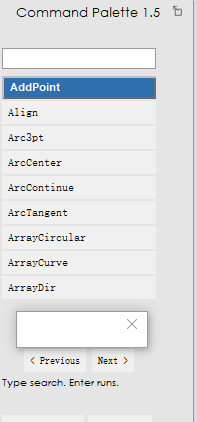
currently you can get a buggy version of CP1.5
in V3 put the two files commandpalette.js and
commandpalette.htm
in:
C:\Program Files (x86)\MoI 3.0\commands
Modals do not work but a partially working
panels keygroups and command palette
works in the MOI UI area...
HI,在v3中组无法被保存,意味着组相关的功能都无法正常使用。个人认为跟/AppData路径相关,在v3中也无法生成CommandPalette.keygroups.txt文件。(Hi, in v3, groups cannot be saved, which means all group-related functions cannot be used normally. I personally think it has something to do with the /AppData path, as the CommandPalette.keygroups.txt file cannot be generated in v3 either.)抱歉我的附件容量已经几乎用完了只剩20KB所以无法上传图片或视频。(I'm sorry, my attachment capacity is only 20KB, so I can't upload pictures or videos.)
hi suiyan, im not sure i can support v3 as its 11+ years old and i also dont know the intricacies of all the
ways it works api, webkit differences etc...getting the existing tool where it has got took me ages,
maybe a lite v3 version is doable. but i want to make the existing command palette better first...
not promising anything but
a good starting point would be to know what your main
requirement is....
So if you could only have one is it:.
keygroups or commands?
keygroups,无法保存组,popout功能和commandpalette <yourkeygroupname> modal功能在v3中无法使用。(Keygroups, Failed to save group, the popout feature, and the command palette <yourkeygroupname> modal feature are not available in version 3.)
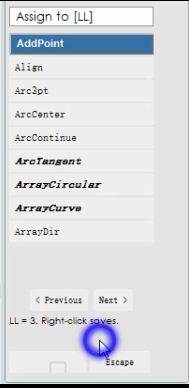
这张图的蓝色光圈证明我点击了鼠标右键,但没有反应,CommandPalette.keygroups.txt也无法生成。
(The blue halo in this image indicates that I clicked the right mouse button, but there was no response, and CommandPalette.keygroups.txt could not be generated.)
在v4,v5中如果CommandPalette.htm,CommandPalette.js位于\MoI 4.0,5.0\commands时popout,command palette <yourkeygroupname> moda功能显示为12014.25正常窗口大小但空白,但group功能能够正常使用因为CommandPalette.keygroups.txt能够正常生成,因为在v4,v5中有默认的\AppData目录。
(In versions v4 and v5, if CommandPalette.htm and CommandPalette.js are located in \MoI 4.0,5.0\commands, the popout command palette <yourkeygroupname> moda function displays as 12014.25 with a normal window size but is blank. However, the group function can be used normally because CommandPalette.keygroups.txt can be generated normally. This is because there is a default \AppData directory in versions v4 and v5.)
在v3中,首先弹出的窗口不是正常尺寸,我想这是因为版本差异,所以popout以及相关的command palette <yourkeygroupname> modal功能不好在v3中实现。但是命令编组功能应该是基础功能吧,如果没有的话,脚本就只能搜索命令和翻页了。
(In v3, the first pop-up window is not of normal size. I believe this is due to version differences, so the pop-up and related command palette <yourkeygroupname> modal functions are not necessary in v3. However, the command grouping function should be a basic feature. If it's not available, scripts can only search for commands and page through.)
This current tool wont work properly in v3
this tool is exclusively tested in v5
when you say about a blank window you also say
"(In versions v4 and v5, if CommandPalette.htm and CommandPalette.js are located in \MoI 4.0,5.0\commands ",
For clarity, the script files
commandpalette.htm
commandpalette.js
currently go in appdata-commands,
(not programme-commands)
"
On Windows you can find the Moi appdata folder by typing Win+R to bring up the Windows "Run" dialog and then type in:
%AppData%\Moi\commands
On Mac from a Finder window, go to the menu and pick Go > "Go to folder" and type in:
~/Library/Application Support/Moi/commands.
"
I like to say for you in particular...If a keygroups solution ever comes for v3 it can only be a one off "curiousity experiment" and would likely be different or "lite"...
5,我只是想既然有按钮就该能实现相应的功能。不过保持原样也行,优先完成这个脚本其它功能的开发。(5. I just think that if there's a button, it should be able to achieve its corresponding function. However, keeping it as it is is also fine. We should prioritize completing the development of other functions in this script.)


 commandpalette_145.zip