Show messages: All
1-4
5-12
From: Matadem
Attached file
the one on top is what I have...the one at the bottom is the desired outcome.
Tnx!
Attachments:
 replacemoi.3dm
From: Michael Gibson
Hi Matadem, if your objects are regularly spaced like that you can use Transform > Array to do it.
Step 1 - use Transform > Copy to copy circle onto lower left element.
Step 2 - Use Transform > Array to make new pattern over top of old one.
Step 3 - Cleanup to Remove old objects - select newly created objects, invert and delete.
Looks like this:
- Michael
From: Michael Gibson
Or to simplify cleanup you can draw in a rectangle for the cell size like this, then you can delete all the old shapes, move the new shape onto the lower left corner of that cell and use the lower left to upper right corners for the array spacing. Then you'll only have that one spacer rectangle to remove for cleanup.

- Michael
Image Attachments:
matadem_array.jpg
From: Matadem
Good day.
no the array was just as an example ..they are all over the place.
Tnx!
From: Michael Gibson
Hi Matadem, can you please post an example that more closely matches your actual case?
- Michael
From: Michael Gibson
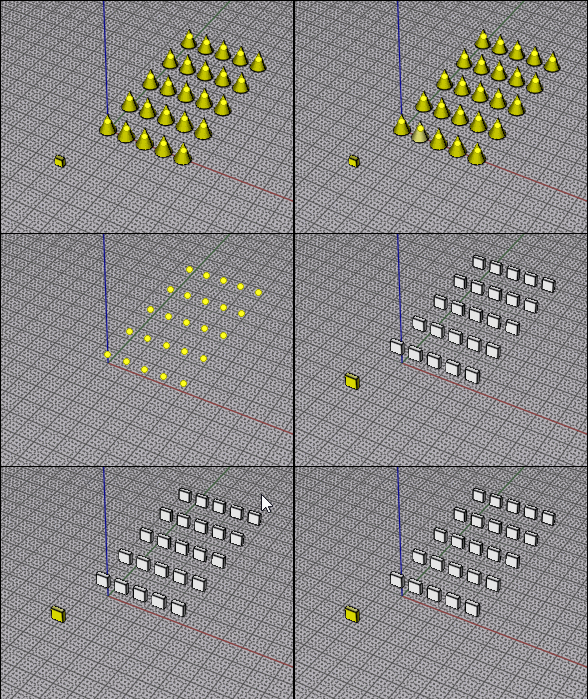
You could use BoundingBoxCenterIndividual from here to place a point at each selected object's center:
https://moi3d.com/forum/index.php?webtag=MOI&msg=10065.2
Then CopyToPoints:
https://moi3d.com/download/scripts/PetrsMoiPage/PetrsMoiPage.htm#CopyToPoints
- Michael
From: Frenchy Pilou (PILOU)
Yep that was that! ;) Made in the past!
From: Matadem
Thanks works great.
Michael please search option for commands and shortcut....without the need to go to option to look it over.
Thanks!
Show messages: All
1-4
5-12

