From: toonafish
I have not use Moi for quite a while, but picked it up to do some more exact modeling. I noticed that theres no sliders in v4 to adjust values like size and one still has to type in the exact numbers.
I know getting the right slider units can be tricky when working with very large or small objects. But maybe it’s an idea to implement them like the sliders worked in XSI, and adjust the slider range by typing in a large or small number ? That worked perfectly in XSI.
Here’s a screencap for those that never used XSI :
https://www.dropbox.com/scl/fi/o3zj30l3r4nhnui6s72id/sliders.mp4?rlkey=m9ry6rcdv6kk3ftlm1hzzehea&st=5jbkalea&dl=0
From: Frenchy Pilou (PILOU)
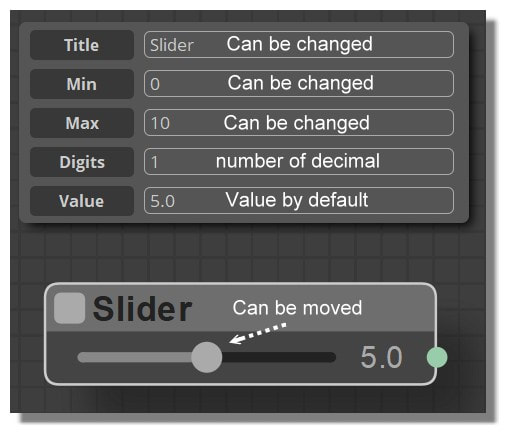
Seems you can have any sliders you want in Moi with Using Elephant! ;)
https://moiscript.weebly.com/biblio-elephant.html
https://moiscript.weebly.com/widget-e.html#bibeslider
From: toonafish
Thanks, I'll check it out...
From: Phiro
Michael,
What is you opinion about this request ?
MoI in standard version (no add-on, no plugin) is using slider in some functionnalities like blend, N-sided,...
I think this idea could be good, but I don't know if it could create some problems.
And I don't know if it will be used by majority of users.
Your vision of your software is more global and more complete than mine.
The video demo seems to be :
- a slider could appear on demand (having sliders everywhere could be to much ?)
- its max value is modified if a value is written. Max value is two times the value written
I wish everyone a merry christmas and happy new year.
From: PaQ
For the blend function, I don't remember going anywhere far from the default value (0.5 - 1.5 ish) ... but anyone has different usage.
Maybe a way to slide the tension directly in the viewport (LMB + drag ?) could match other direct operation (like the fillet radius control) ? ... not sure about the side effect implication.
From: Michael Gibson
Hi Phiro,
re:
> What is you opinion about this request ?
Well it looks like a rather large control. It would probably be difficult to expand every input field to be so wide.
The current UI is expecting input fields to be more compact than that because they need to fit within the side pane along with a text label and units label like this:

- Michael
Image Attachments:
 input_field.png
From: Phiro
Perhaps a slider could be added hidden and when you push a small button near the numeric field could switch unhide/hide the slider ?
Just an idea...
From: Michael Gibson
Hi Phiro,
re:
> Perhaps a slider could be added hidden and when you push a small button near
> the numeric field could switch unhide/hide the slider ?
> Just an idea...
There is something similar to that - the numpad that pops up when you click on a field.
Maybe a slider could actually go on the numpad, since that goes into its own separate flyout window it could have wider stuff in there.
- Michael

