Show messages:
1-2
3-22
23-42
43-62
63-82
83-102
103-104
From: Frenchy Pilou (PILOU)
A black hole! :)
From: BurrMan
The corrected file and creation process has the "Move" actually perform faster and smoother also... not just "mangled surface"
Just a note from a fading laptop...
From: BurrMan
Question regarding the fillet options. The ACIS fillet loses the ability to use the G2 and G3 options. Do you plan on keeping the Solids++ or can ACIS produce these options in the future?
Thanks.
From: danperk (SBEECH)
Thanks for the new beta Michael!
From: Michael Gibson
Hi Burr,
re:
> Do you plan on keeping the Solids++ or
I don't have any immediate plans for removing the option to use the old fillets with those options.
> can ACIS produce these options in the future?
It's highly unlikely. But there are a couple of other fillet mechanisms in ACIS though like some face/face operations that I could try out in future versions.
- Michael
From: BurrMan
“””””” But there are a couple of other fillet mechanisms in ACIS though like some face/face operations that I could try out in future versions.”””””
Aha! Appears the equivalent of current “blend” where it can fill non connected. And also “hold lines” for continuity control….
The future is bright. Thanks for your time.
From: Frenchy Pilou (PILOU)
Something more speedy and more easy for select only fillets for erase them in some cases!
Like on pyramid first post :
https://moi3d.com/forum/index.php?webtag=MOI&msg=11803.1
- Select the Object
- Up Right Menu Details / Faces /Plan = n Faces --> Click "Faces"
- x Planar --> Click "Planar"
- Invert Selection
or even more speedy ! ;) You must have your object alone on the screen! So Select it Invert Selection / Hide)
- Browser "Types"
- Faces / Planar!!! (Right Click on "Planar" for select them )
- Invert Selection
then
Remove Fillets by
Shift + Del key
or Right Click + Shift
or Right Click on Del Button (red "x" Left bottom Bar)
Et voilà! :)
Does it possible to have a script for that ? For ultra speedy users that i am not... due bad memory ! :)
From: Frenchy Pilou (PILOU)
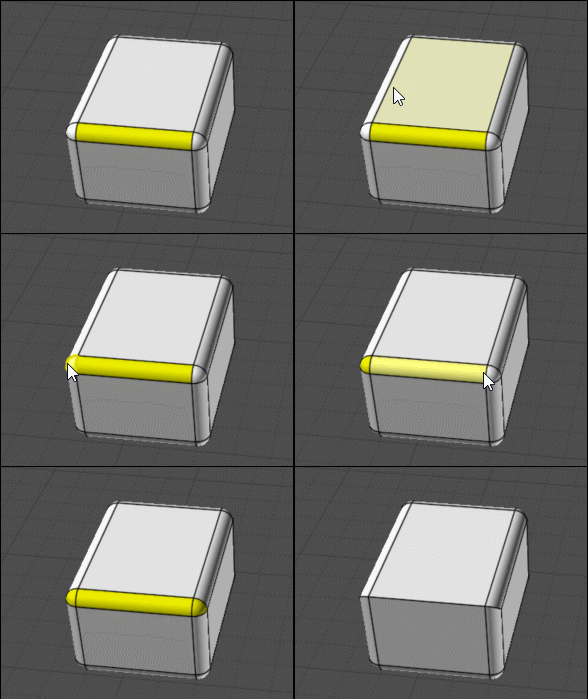
Else for partial fillets remove ! ;)
From: Michael Gibson
Hi Pilou, for fewer steps you could do -
"Details..." button, then on the object properties dialog, click "Faces", then Ctrl+click on "Planar" to deselect those.
Or on Scene Browser, Types section, click on the selection dot area for "Faces", then click on selection dot on Faces > Planar to deselect planar faces.
- Michael
From: blowlamp
Frenchy.
If you delete just the rounded apex faces you get 'straight corners' on the fillets. ;-)
Martin.
From: Frenchy Pilou (PILOU)
Ah excellent! Another hidden fonctions!
From: Frenchy Pilou (PILOU)
@blowlamp
Yep but you don't obtain the same result!
All depend of what do you want! ;)
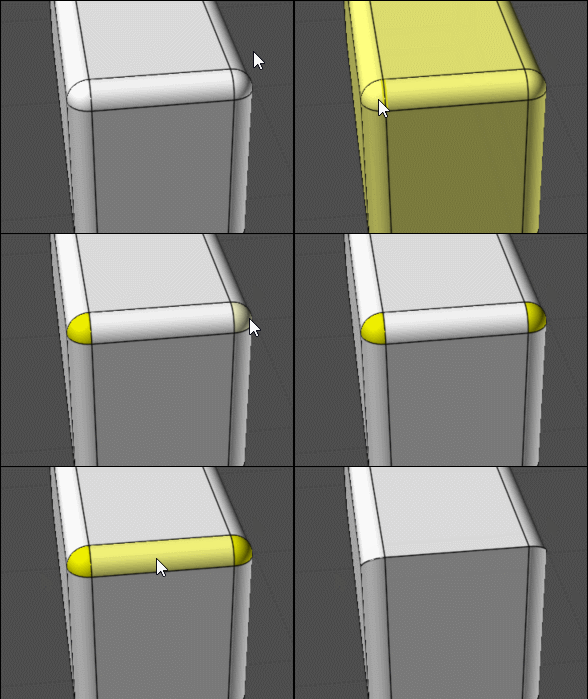
But maybe Apex is another thing... ? What is exactly ?
And what is your selection ?
From: blowlamp
Frenchy.
You're showing what I meant in your GIF.
The fact that it's now possible to have straight corners and rounded corners in any combination is a plus as far as I'm concerned. ;-)
The same trick also works with Chamfer. ;-)
Martin.
From: twofoot
I've been waiting for this since v3!
Thank you!
From: ganim3d
looks like u are hitting the same overhead as
https://www.youtube.com/watch?v=WvwiH1DOK1M
great improvements, have been asked for a long time !
From: blowlamp
Not a question about the Sep-!7-2025 beta in particular.
I know it's possible to enter fractions such as 17/64" without having to convert to decimal, but is there a formatting rule where I can enter a measurement of something like 4 9/16" directly?
I occasionally get these dimensions in drawings I receive and don't enjoy converting them. ;-)
On my mobile phone calculator, entering 4+9/16 seems to give the right answer.
Martin.
From: Michael Gibson
Hi Martin,
re:
> I know it's possible to enter fractions such as 17/64" without having to convert to decimal, but is there
> a formatting rule where I can enter a measurement of something like 4 9/16" directly?
Yes, you need to have a unit system set other than "No unit system", and you need a foot (') or inches(") mark in your input.
Then you can use either a space or a hyphen to separate whole inches from the fractional part, like:
4 9/16"
or
4-9/16"
- Michael
From: SPARTAN-D421 (SIERRA-D421)
Just saw this. Currently installing as I speak, and I am super excited to try this out.
From: blowlamp
Thank you Michael.
It's now working for me if I use a hyphen, but not with a space and of course I was previously using a space.
My unit system is set to millimetres.
Martin.
From: Mik (MIKULAS)
Amazing and everyday useful ACIS funkcionality, excellent job, Michael!
Thank you.
Mik
Show messages:
1-2
3-22
23-42
43-62
63-82
83-102
103-104

