Show messages:
1-12
13-32
33-52
53-72
73-92
93-112
113-132
133-140
From: MO (MO_TE)
Hi PILOU
It looks great! Thanks for your contribution. :)
It's ok if translated descriptions are shorter or longer in length. You can write any description with any length. It'll fit in the tooltip box automatically.
>> I f you make some new things put them in some new embeded lines... :)
>> So made a little cooking Copy Past between the codes of the Lang files.
Ok, but, I think it is almost a complete list of words.
Yesterday, I improved the searchbox, So, You can search nodes in your language.( EN, FR, RU )
It doesn't need any additional translation. :)

Image Attachments:
 NEPlus_SearchBox.png
From: Frenchy Pilou (PILOU)
@Mo_Te
Super!
I have a little problem
the 2 "Entrée" & "Sortie" on the Macro section don't give any nodes!
Does this normal ?
EDIT : OK I have Found!
I must "open" the Node Macro first (then Clik on it ) !
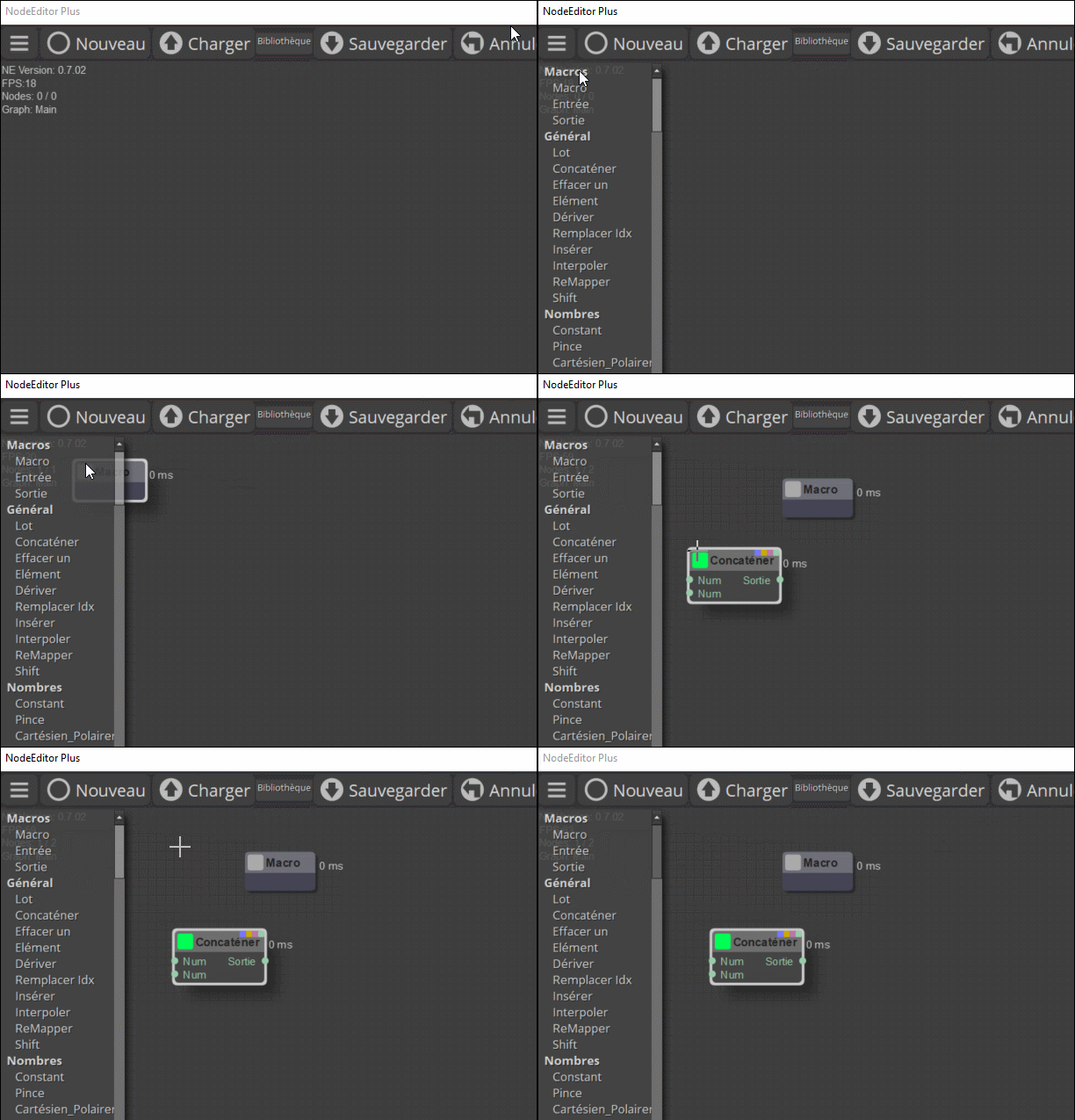
Solution of the little problem! ;)
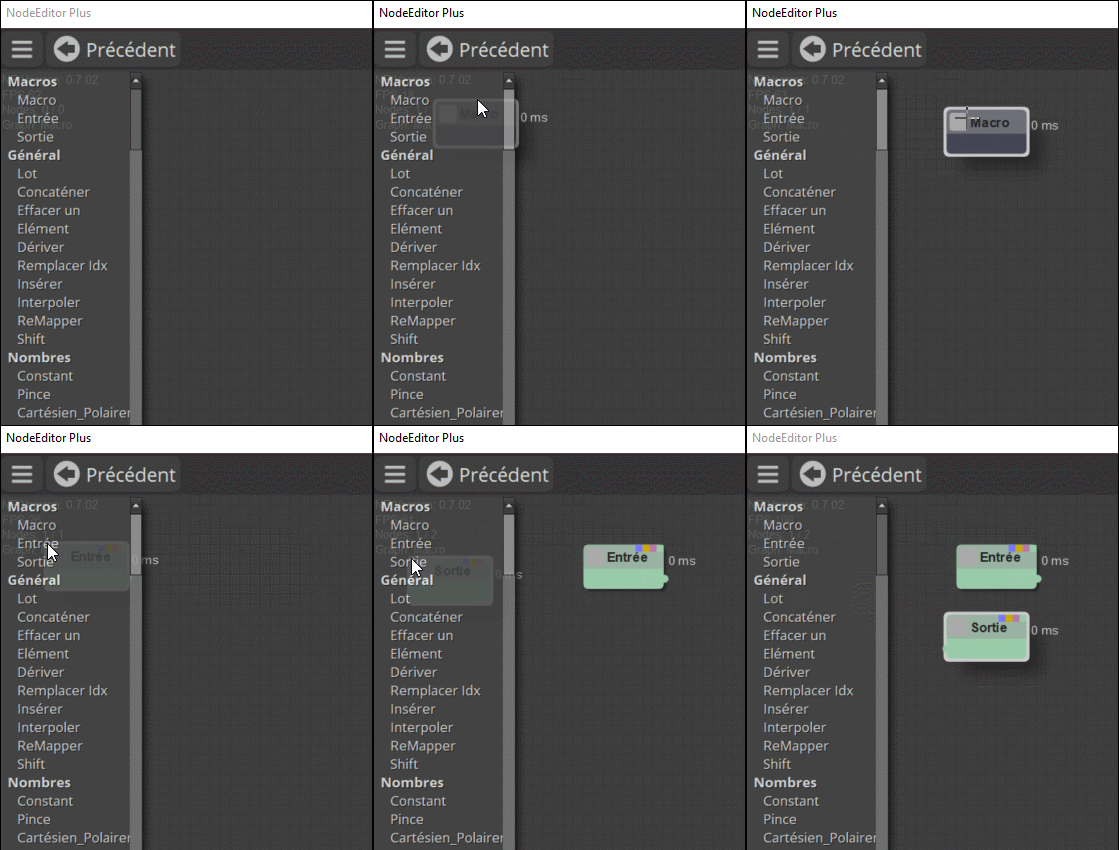
From: MO (MO_TE)
Yes, "Macros/Input" and "Macro/Output" nodes are only available in "Macros/Container" (Macro).
From: Frenchy Pilou (PILOU)
Many corrections to the French lang.js :)
https://moiscript.weebly.com/uploads/3/9/3/8/3938813/lang_save03.js
From: rjp74 (RJPOPE)
Hi, you have made some wonderful improvements. One thing I would love is a check box on the output node to enable or disable it. I usually have several output nodes and often want to turn them on or off to focus on different parts of the model. Sometimes I just disconnect them for simple models but for more complex models I usually add a switch node before all outputs which solves the problem but I feel an integrated solution would be better.
From: MO (MO_TE)
Hi
Actually, This is an existing feature inside the NE Plus, (Embedded widgets)
But, I haven't used it in an actual node yet. Except inside some widget nodes.
Find "Widget/Widget Examples" node to see some examples of embedded widgets.
If you want to study the code, see the "EmbeddedWidgets.js" under "NodeEditorPlus\nodes\extensions"
Here is a quick attempt to add a toggle for enabling or disabling the output node.
I haven't tested it correctly, but, it seems to work ok.
Replace attached file with "objects.js" file in the "nodes" folder.
Let me know if you find it useful.
Attachments:
objects.js
Image Attachments:
Widgets.png
From: fcwilt
Hi,
I'm getting an error message:
NodeLibrary.cfg.htm not found!
What have I done wrong?
Thanks.
Frederick
From: bemfarmer
Windows or Mac?
This .htm file has one code line, an address: Node Library;MOI\NodeEditorPlus\NodeLibrary
and may be located for Windows 11 at C:\Users\...yourFileAddressName...\AppData\Roaming\Moi\NodeEditorPlus\core\NodeLibrary.cfg.htm
- Brian
From: Michael Gibson
Hi Frederick,
re:
> I'm getting an error message:
>
> NodeLibrary.cfg.htm not found!
Does the error happen immediately when you launch the node editor or does it happen when you use something in particular?
What version of MOI are you using and what is your operating system?
Also where have you installed the node editor?
Thanks,
- Michael
From: Psygorn (DRILLBIT)
Hi mkdm,
It’s a bit off-topic, but it might still be useful if you’re really trying to learn more about Max.
It seems James had some connections with him on IG, which could help you trace things further —if that's what you really are looking for.
https://moi3d.com/forum/index.php?webtag=MOI&msg=6837.86
And yes — he really was a legend!
But who knows… we might have a new legend now :-)
Best,
Psygorn
From: MO (MO_TE)
Hi Everyone
Finally, the new version of NodeEditor Plus is ready! Check it out here:
https://moi3d.com/forum/messages.php?webtag=MOI&msg=11614.1
- Auto-Save
- Auto-Scroll
- Keyboard shortcuts support
- Added a full set of image and svg nodes
- Added A new menu for dialog related nodes
- Added some new Math functions
- Added translation support to "Searchbox"
- Added unsaved changes dialog
- Fixed Undo/Redo
- Lots of bug fixes
- And more
Check the "ChangeLog.txt" for more details.
Best wishes to you all :)
From: Frenchy Pilou (PILOU)
So I suppose a new little work for the next year if i want totally translate nodes in French and
complete my
https://moiscript.weebly.com/biblio-elephant.html !
I don't know if i must thank you! ;)
!
Have happy Christmas !
PS I suppose it will compatible with the next V 5 ?
One big release was in 22 Décembre 2024 !
From: MO (MO_TE)
Thanks PILOU! :)
Yes, I've added the new words to the end of your last work. lang.js ~ Line 2330
From: Frenchy Pilou (PILOU)
Very cool...then French Text Installation done! ;)
https://moiscript.weebly.com/biblio-elephant.html
Rest 2330 to 4155 to make by me! :)
Excellent!
I have translated one line for test the process : that works fine! :)

From: Zooen
Hi,
For French users who are new to NodeEditor Plus, it should be noted that EN must be changed to FR at the beginning of the keyboard shortcut that must be copied and pasted into “Options” > “Shortcuts” in order to obtain the French translation.
From: MO (MO_TE)
Hi PILOU
>> Rest 2330 to 4155 to make by me! :)
You don't have to translate all the lines. Just up to line 2980 is enough.
From: Frenchy Pilou (PILOU)
Good to know... and I will see by use if there are some holes! :)
For French users language The right column of shortcuts calling the new Editor Plus must be something like that! (thx Zoen)
(only one unic line)
var theme = 'Default'; /* Theme options: Default,Light,SkyBlue,Autumn,Lavender */ var language = 'FR'; /* Language options: EN,RU,FR */ moi.ui.createDialog( 'moi://appdata/NodeEditorPlus/index.html?scheme='+theme+'&lang='+language+'', 'resizeable,defaultWidth:870,defaultHeight:480', moi.ui.mainWindow );
From: Frenchy Pilou (PILOU)
@ Mo_TE
> 2990 Why not translate also from there ?
It's not tooltips ? So very useful for user ? :)
And for something like that ? Must in keeping "the"_" or no need to translate ?
"stroke_width" : "stroke_width",
"line_filter" : "line_filter",
From: MO (MO_TE)
Hi PILOU,
>> 2990 Why not translate also from there ?
You've already translated most of those node descriptions. Check out line 1160
I used the last words you mentioned to override older node descriptions in English. One day, I'll remove/merge them with their respective nodes.
>> And for something like that ? Must in keeping "the"_" or no need to translate ?
>> "stroke_width" : "stroke_width",
>> "line_filter" : "line_filter",
There is a bug in main.js that prevents some properties in the info panel from translating correctly. It seems it changes the property names for display reasons. For example, it changes "line_filter" to "Line filter." I'll see if I can fix it.
Regarding the question: the right-side words can be anything. The left part should be untouched.
"stroke_width" : "stroke width",
"line_filter" : "It can be anything!",
"#Twist" : "Torsion",
"@Macro inside a node" : "Macro à l'intérieur d'un Nœud",
From: Frenchy Pilou (PILOU)
Thanks for the info but there are always these 3 errors! In the order...
(English version works fine)
French version with the adapted shortcut (yours) gives that and nothing displaying after!


Show messages:
1-12
13-32
33-52
53-72
73-92
93-112
113-132
133-140

