Generating an object in NodeEditor is quite similar to how it's done in moi, but with parametric capabilities.
Here are two simple methods to generate a pyramid.
>> a node Object / Selected don't exist anymore ?
This node has been relocated to the "Select" menu, under the title "Select Scene Objects". It's also accessible in the search box.
Hi Mo,
been playing with your unwrap curve / surface node.
Have you an example as getting shapes that need scaling so not sure I am using it correctly.
Cheers
Barry
Pilou,
this is why I am not sure if I am using it correctly.
The unwrapped in these cases are 1 x 1 but if scaled looks correct.
In others they are scaled correctly in one direction only.
Cheers
Barry
Hi PILOU,
>> seems there is an error when i want copy a node...
Thanks for reporting the issue.
I couldn't regenerate the error here, but if you're still getting this error, please post the .nod file, so I can take a look.
Could you tell me which method you used to copy the nodes that caused the issue?
1- Right clicking on nodes and copy
2- Pressing Ctrl key and dragging nodes
3- Using shortcut ( Ctrl+C )
>> 3 different cubes are drawn : how to integrated them as 3 different nodes selected ?
You can use the "Concat" node under "General/Concat". ( See attached node )
Right click on the node to add more input slots via"Inputs " menu.
If you need to remove a slot, right click on the last input slot and select "Remove Slot".
But as i don't now how even process with this new Node Editor Plus against the Official old original one by Max Smirnov... that i have quasi all documented... French / English ! ;) https://moiscript.weebly.com/node.html
I can't help the Ai itself! :)
I am blocked how to select object(s) on the screen for integrate them on the Editor + ! :)
Given by the Ai !
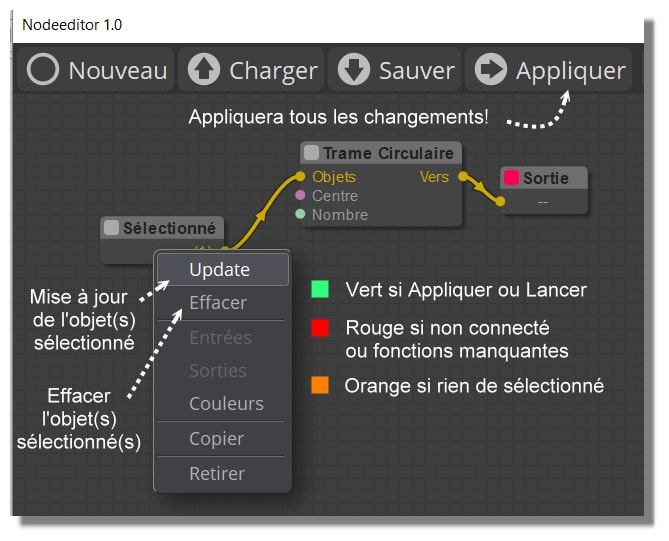
In the Old you made Update! :) (as shown following... Golden Age ! :)
Ps Your Tab Library is a must for have some examples!
Render here with free Gemini
Thanks for the nod file. I checked your file and Yes, As you've guested, the ai generated nod has some issues.
Node editor expect the links property to be a JSON Object where the keys are the stringified Link IDs. However, the AI model mistakenly generated it as a JSON Array padded with null values.
Also, there is another issue. Your AI model kind of guessing the node types and class names due to lake of information. This generates some "Missed" nodes (not existing nodes) that results in blocked graph.
In your file, you have "Objects/Get Objects" node, That's not a correct node inside node editor. The correct node type is "Select/Select Scene Objects". That's why you don't get the update. The same happens for the old node editor.
Of course now with any object you can make parametric Transform Array ! :)
Will be the next exercice! :) (for the Ai! ;)
But i make a little wait because today there is a new version Nano Banana (2.5) who must be released!
So servers are some perturbated! :)
My apologies for the delay; I overlooked your question.
So, here it is, I hope I understand the questions correctly.
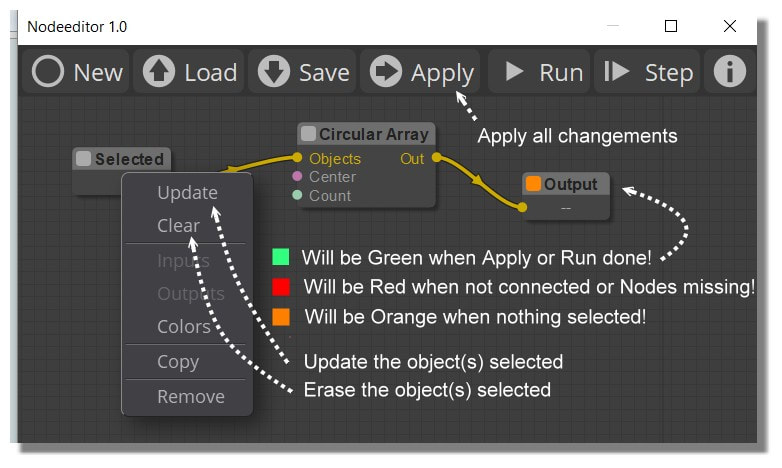
To use the objects from the moi viewport, node editor provides 3 nodes:
A: Select/Select Scene Objects
Select the object in the viewport, right click on the node and click on "Update". You can clear the selection by clicking on "Clear".
B: Select/Select By Style
Selecting the node opens a property panel, Choose the desired styled object from "Style" dropdown menu.
C: Select/Select By Name
Selecting the node opens a property panel, Choose the named object from "Name" dropdown menu.
>> why the reduce size of the close window (-) to the task Barre is not working ?
It seems moi disables the dialog's minimize button by default. However, You can resize the window to a smaller size.
>> Have you something for enable Acis / Solid++ ?
I'll add a new "Library" property in the fillet node.
>> Zoom fit the Screen Editor ?
Press the F key to fit the view to the selected nodes or fit to all nodes if nothing is selected.
>> Clear All Nodes ?
Click and hold the "New" button.
>> And how to keep the result ? (In fact exit of NodeEditor without lost result)
Click the "Apply" button to add the geometry to the scene.
>> What is a base and target Frame for this one ? (Array3D node)
This is an older node ported from Max Smirnov's "Array3D" command, so I may be slightly off. However, I believe the Base and Target frames override the Move X, Y, and Z node inputs. This is useful if you need to move or rotate the input object relative to a specific point.


 NE-Menu-Select.png


.png)