MoI discussion forum

Full Version: NodeEditor Plus [Unofficial]

Show messages:  1-6  …  47-66  67-86  87-106  107-126  127-140

From: MO (MO_TE)
1 Jan   [#107] In reply to [#106]
Hi Pilou,
Thank you for your contribution to the French translation.
Node tooltips are accessible via holding Alt and left-clicking on the node.

>> do i must Copy Past lines 2983 - 4157 and put FR
>> then Translate

You can leave them as they are; They are not for translation. thank you.
From: Frenchy Pilou (PILOU)
1 Jan   [#108] In reply to [#107]
THx for the Infos!
From: Frenchy Pilou (PILOU)
1 Jan   [#109]
Yep but i can make that! ;)


Ps Seems thats working also fine with the French version !


From: Frenchy Pilou (PILOU)
1 Jan   [#110]
You right all is yet fine i don't know why! :) (French Tooltips also) D:)

https://moiscript.weebly.com/uploads/3/9/3/8/3938813/lang.zip

https://moiscript.weebly.com/biblio-elephant.html
From: Frenchy Pilou (PILOU)
1 Jan   [#111]
For a little test... transform a cube to a pyramid ... as the direct generation of the file don't yet works
Here the manual method not sure that really help! :)
1. Create the Base Shape ... Add a Curve/Rectangle node.
Set Width to 20 and Height to 20.

This represents the footprint of your shape on the ground.

2. Elevate the Top Profile... Add a Transform/Move node.
Connect the Rectangle output to the Objects input of the Move node.
In the Translation field, set the Z value to 30 (format: 0,0,30). This defines the height.

3. Control the Taper (The "Magic" Step) ...Add a Transform/Scale node.
Connect the Move output to the Objects input of the Scale node.
Crucial: Set the Center of the Scale node to 0,0,30 (the same height as your moved square).
Add a Basic/Slider node. Set its range from 0.0 to 1.0.

Connect the Slider output to the Factor input of the Scale node.
Slider at 1.0 = Cube
Slider at 0.0 = Pyramid

4. Group the Profiles... Add a Logic/BundleArray node.
Connect the original Rectangle (from Step 1) to In 1.
Connect the Scale output (from Step 3) to In 2.
This creates a list containing both the bottom and top squares.

5. Generate the Volume...Add a Construct/Loft node.
Connect the BundleArray output to the Profiles input.

MoI3D will now stretch a "skin" between the two squares.
6. Final Output... Add a Basic/Output node.
Connect the Loft output to it to see the final geometry in the MoI3D viewport. ...

Quick Tip: If you want the pyramid to be "solid" (a closed BREP),
make sure to check the "Cap ends" option if it's available in your version of the Loft node, or use a Solid/PlanarSrf on the result.

Curious result ... but surely schematic


From: Frenchy Pilou (PILOU)
1 Jan   [#112]
a node Object / Selected don't exist anymore ?

Waiting more something like that! :)

But not yet tested because it's while i don't touch this sort of thing!

But terrific if you can ask an Ia to make for you anything you want without knowledge of Nodes!
Maybe not today at 100% but surely after tomorrow!


From: MO (MO_TE)
2 Jan   [#113]
Generating an object in NodeEditor is quite similar to how it's done in moi, but with parametric capabilities.
Here are two simple methods to generate a pyramid.

>> a node Object / Selected don't exist anymore ?

This node has been relocated to the "Select" menu, under the title "Select Scene Objects". It's also accessible in the search box.

Image Attachments:
NE-Menu-Select.png  NE-Pyramid.png  NE-Search-Select.png 


From: Frenchy Pilou (PILOU)
2 Jan   [#114] In reply to [#113]
Excellent! Where is the Search Box ? (how to call it ?

Center ?
From: MO (MO_TE)
2 Jan   [#115] In reply to [#114]
>> Where is the Search Box ?

Double-click on the canvas (NodeEditor window) :)
From: Frenchy Pilou (PILOU)
2 Jan   [#116] In reply to [#115]
That is wortking!
From: Rich (-RB-)
3 Jan   [#117]
Great Work MO!

// Rich
From: Barry-H
15 Jan   [#118] In reply to [#1]
Hi Mo,
been playing with your unwrap curve / surface node.
Have you an example as getting shapes that need scaling so not sure I am using it correctly.
Cheers
Barry
From: Frenchy Pilou (PILOU)
15 Jan   [#119]
Works as aspected! Sorry in French but...


Pinky curve is planar and has same length than green one!
It's the same for you ?

Curious! https://moiscript.weebly.com/uploads/3/9/3/8/3938813/planar_curves.3dm

From: Barry-H
15 Jan   [#120] In reply to [#119]
Pilou,
this is why I am not sure if I am using it correctly.
The unwrapped in these cases are 1 x 1 but if scaled looks correct.
In others they are scaled correctly in one direction only.
Cheers
Barry


Image Attachments:
Screenshot (34).png 


From: Frenchy Pilou (PILOU)
23 Sep   [#121]
seems there is an error when i want copy a node...


From: Frenchy Pilou (PILOU)
23 Sep   [#122]
A long time to not use this sort of thing! :)

How to update an object to the node ?
say 3 different cubes are drawn : how to integrated them as 3 different nodes selected ?
From: Frenchy Pilou (PILOU)
23 Sep   [#123]
No Video like this for NodeEditor Plus ?


From: MO (MO_TE)
23 Sep   [#124] In reply to [#121]
Hi PILOU,
>> seems there is an error when i want copy a node...

Thanks for reporting the issue.
I couldn't regenerate the error here, but if you're still getting this error, please post the .nod file, so I can take a look.
Could you tell me which method you used to copy the nodes that caused the issue?
1- Right clicking on nodes and copy
2- Pressing Ctrl key and dragging nodes
3- Using shortcut ( Ctrl+C )

>> 3 different cubes are drawn : how to integrated them as 3 different nodes selected ?

You can use the "Concat" node under "General/Concat". ( See attached node )
Right click on the node to add more input slots via"Inputs " menu.
If you need to remove a slot, right click on the last input slot and select "Remove Slot".

>> No Video like this for NodeEditor Plus ?

Unfortunately, There is not much tutorial contents for Node Editor Plus right now.
Here are a few examples. I'll update it if I find more.
https://moi3d.com/forum/messages.php?webtag=MOI&msg=11886.1
https://moi3d.com/forum/messages.php?webtag=MOI&msg=11887.1

Attachments:
Concat Node.nod

Image Attachments:
Concat Node.png 


From: Frenchy Pilou (PILOU)
24 Sep   [#125]
@ MO_TE
THx for the Infos!

No problem with your previous file .nod! :)


Fortunately, I kept my previous false one! :)

Same error with the 3 methods of copy on any of nodes!

It's a file generated by Ai maybe this explain that! ;)

Just ak you want and the Ai return a file Json format!

Just load it in a "text editor" and save it as a node file format .nod!

That is perfect for "normal people" like me because "Node coding" is not a so easy evident thing!

https://moiscript.weebly.com/uploads/3/9/3/8/3938813/inverse_fillet.nod

But as i don't now how even process with this new Node Editor Plus against the Official old original one by Max Smirnov... that i have quasi all documented... French / English ! ;)
https://moiscript.weebly.com/node.html

I can't help the Ai itself! :)

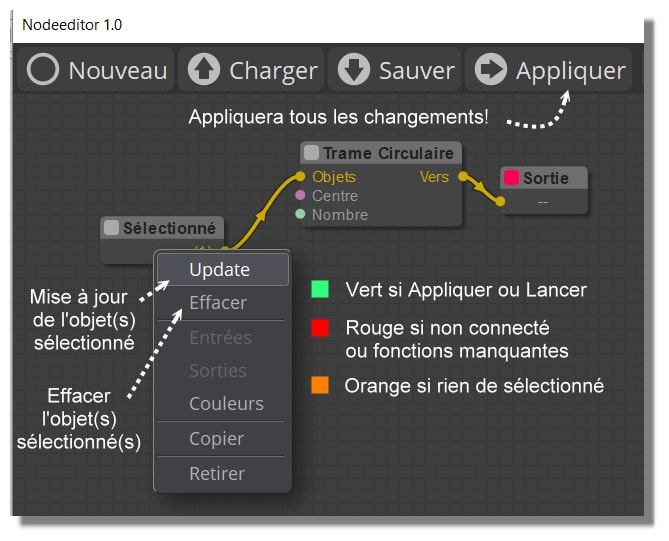
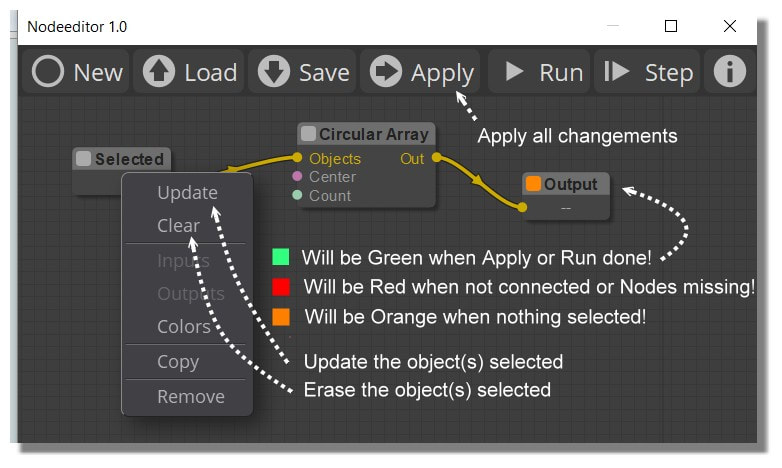
I am blocked how to select object(s) on the screen for integrate them on the Editor + ! :)
Given by the Ai !


In the Old you made Update! :) (as shown following... Golden Age ! :)


Ps Your Tab Library is a must for have some examples!
Render here with free Gemini


From: MO (MO_TE)
24 Sep   [#126] In reply to [#125]
Hi PILOU

Thanks for the nod file. I checked your file and Yes, As you've guested, the ai generated nod has some issues.

Node editor expect the links property to be a JSON Object where the keys are the stringified Link IDs. However, the AI model mistakenly generated it as a JSON Array padded with null values.

Here is your file:
code:
"links": [
	null,
	null,
	{"id": 2, "origin_id": 3, "origin_slot": 0, ...}
	...
]

It should be like this:
code:
"links": {
  "2": {"id": 2, "origin_id": 3, "origin_slot": 0, "target_id": 22, "target_slot": 0, "data": null},
  "3": {"id": 3, "origin_id": 45, "origin_slot": 0, "target_id": 22, "target_slot": 1, "data": null},
  "4": {"id": 4, "origin_id": 22, "origin_slot": 0, "target_id": 4, "target_slot": 0, "data": null},
  "30": {"id": 30, "origin_id": 61, "origin_slot": 0, "target_id": 45, "target_slot": 0, "data": null},
  "31": {"id": 31, "origin_id": 51, "origin_slot": 0, "target_id": 45, "target_slot": 1, "data": null},
  "32": {"id": 32, "origin_id": 62, "origin_slot": 0, "target_id": 61, "target_slot": 1, "data": null}
},


Also, there is another issue. Your AI model kind of guessing the node types and class names due to lake of information. This generates some "Missed" nodes (not existing nodes) that results in blocked graph.
In your file, you have "Objects/Get Objects" node, That's not a correct node inside node editor. The correct node type is "Select/Select Scene Objects". That's why you don't get the update. The same happens for the old node editor.

Here is the fixed nod.

Attachments:
inverse_fillet_Fixed.nod


Show messages:  1-6  …  47-66  67-86  87-106  107-126  127-140