From: bemfarmer
A mounting plate for a limit switch was needed, to be 3D printed, for a little 3018 CNC "engraver."
MoI5beta and calipers were used.
In order to countersink a Hex Button Head Cap Screw, a MoI Cone was used.
The head of the 3mm screw is tapered approximately 45 degrees.
The base diameter of the cone was 6 mm, and the height was 1.5 mm. These dimensions are slightly larger than needed.
Boolean difference with the mounting plate created the countersink.
Export solid plate as STL.
Use Prusa Slicer to create gcode.
Now to do the printing...
- Brian
From: bemfarmer
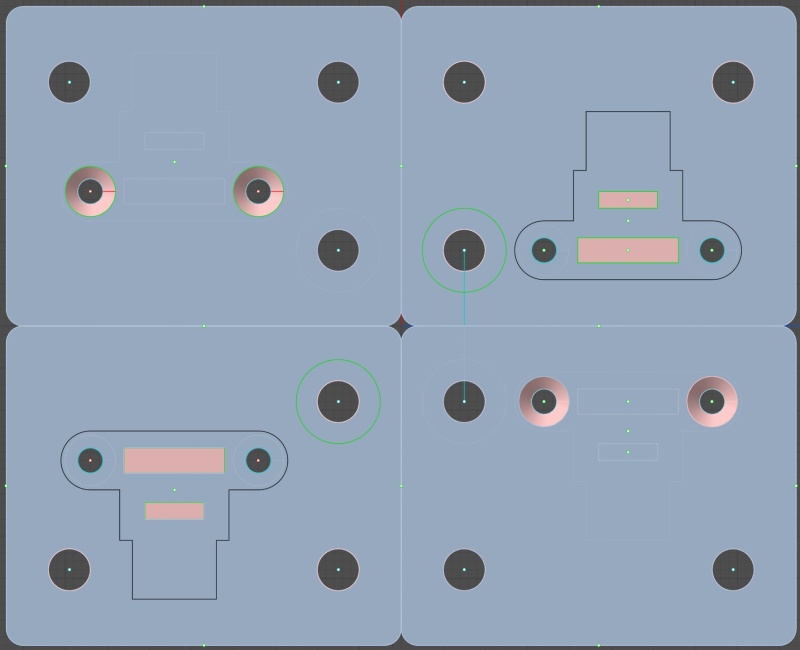
Front and back pictures of the two slightly different mounting plates. The mount of the switch is different for the X+ and X- plates, due to travel direction of activation.
The plates look nice in either Default Theme, or Dark Theme views in MoI.
The RedLt colored rectangular offsets are to accommodate the pins soldered to the pc board.
The plates mount to 20_40 aluminum extrusions. Activation will be by a 3D printed double wedge, mounted to the moving table...
ImageBox.com address:
- Brian
From: tom_tm (TOMF)
Thanks for this, Brian! I was tearing my hair out trying to figure out how to do a countersink in a hole. I'm still playing with the MoI demo (I really love this CAD software btw). I hope the developer of MoI (Michael) makes this into a proper feature in the new version as MoI is an excellent alternative to many of the other offerings available. Or perhaps someone would be so kind as to write a script that would do a countersink in a hole.
From: pressure (PEER)
If you have a bunch to do then make a tool that cuts the hole and countersink in one shot using Boolean > Diff

Attachments:
 countersink.3dm
Image Attachments:
countersink.png
From: tom_tm (TOMF)
That's an excellent tip. Thanks!
From: christian (CHRI)
hi
You can call chamfer functiion !
christian
Image Attachments:
chamfer.png
From: shayno
Hi There
if a hole is too close to a side edge it will often not chamfer as the left block
using a cutting solid will also cut the edge out
cheers

Image Attachments:
Screen Shot 06-30-26 at 09.21 AM.JPG
From: blowlamp
Hi shayno.
Try using the ACIS option for chamfers in V5 - it seems to work just the same as boolean difference.
Martin.
From: ado1
MOI isn't very intuitive for holes when you first start using it, especially if you've moved from a CAD environment
If you want to drill a partial depth hole then you can use extrude/bothsides to your correct depth and boolean it out


Image Attachments:
hole1.jpg
hole2.jpg
From: tom_tm (TOMF)
ado1, I trained using Solidworks, and tbd, MoI3D comes pretty close in terms of workflow. Sure, there are differences of course, as Solidworks, at least the 2001 version of SW, is a full-on industrial/mechanical CAD experience. But the overall feel of MoI3D is more Solidworks than say, Cheetah3D. I love how MoI3D is very precise when using measurements. Few other 'modelling' CAD's offer that on a budget. It's brilliant that Michael Gibson is still after all these years supporting MoI3D, and because of I'll probably buy a copy as soon as I get paid.
But back to the countersinks, thanks to all about the chamfer. I initially tried that but it didn't work. But now I understand why.

