Custom Truck Tutorial Part 7: Hood & Door Seams
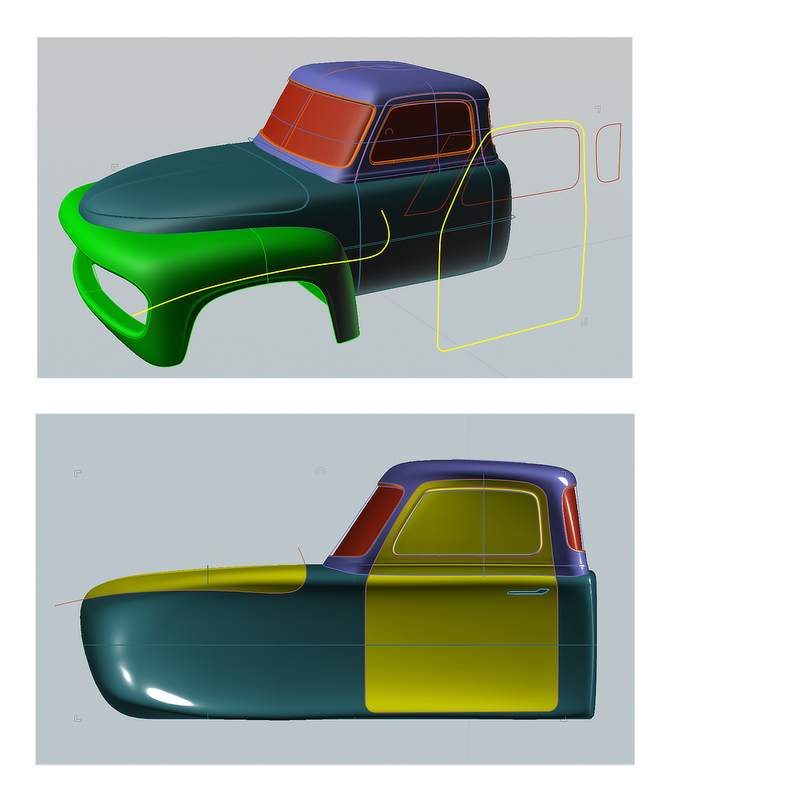
The hood and door seams are created using Boolean Merge followed by Fillets on the resulting edges.
In side view, draw a closed curve to represent the cab door opening. Draw an open curve to represent the hood opening.
Select the Upper and lower cab, and Boolean Merge with the two curves. The lower cab is now 3 solids and the upper cab is 2 solids.
Select the 3 lower cab solids and Fillet 0.14” Const Distance.
Select the door & door frame edges on the upper cab solids and Fillet 0.14” Const Distance.
That's almost everything. Finish by making some door handles, rear bumpers, exhaust pipes, running boards, front grill, and headlights.
Have fun! |
