Custom Truck Tutorial Part 3: Front Fenders and Lower Hood
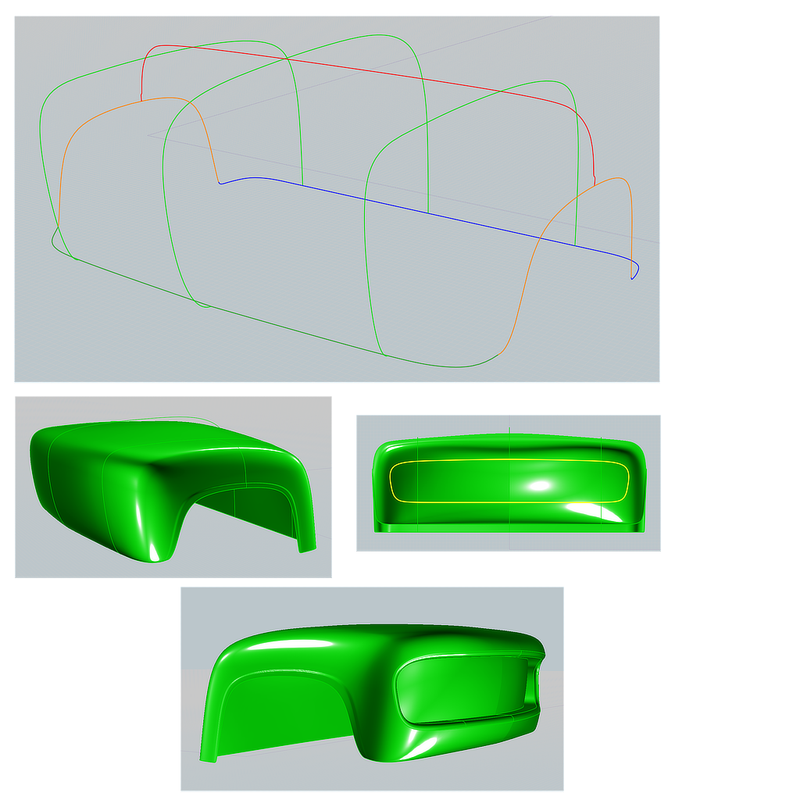
Construct the Network curves below to create the Front End in one go:
Network the eight curves: Network: Lighter. Note: The “Lighter” Network option gives an overall smoother result, at a slight loss of accuracy, due to fewer points being sampled on the input curves.
Once the overall shape was satisfactory, I modified the red curve to form two small bumps to make the lips around the wheel openings, and then performed the final Network operation.
In front view, draw a closed curve to represent the grill opening (Try to keep the point structure simple). Extrude (No Cap Ends) the curve into the Front End (but not out the back). Next, select the extrusion and the Front End, and then Boolean Merge. This results in a single cut out surface over the grill opening. Delete the extrusion as it is no longer needed.
Select the cutout surface resulting Merge and move it back 5”. Select the edges around the cutout, and Join to create a closed curve surrounding. Likewise, select the edges around the grill opening and Join to create a closed curve surrounding the opening. Select both curves and Loft Normal : Exact.
Select the Front End assembly, the lip, the back of the grill opening, and Join. The entire front end is now one joined surface.
Select the sharp edges at the front of the lip (made easier if you temporarily hide curves) and Fillet = 1” Circular. Finally I clicked on the grill back and assigned a different color so I can assign a unique material in my render program.
 |
