Hi Andre,
re:
> If I select the two profiles, choose "Sweep" and then select the rail, I get this:
> <....>
> which isn't really what I want.
The reason you get that result is that Sweep functions by moving the profiles along the rail and also rotating them at each rail position so they are perpendicular to the rail curve.
Because your curve has a smaller radius of curvature than the length of the profiles, the profiles are going to bunch up on top of each other as they traverse the bend.
You can get an idea of what's happening if you use Transform > Array > Curve to duplicate a profile the curve, it uses a similar mechanism:

Or also here's a simpler view of the same kind of situation:
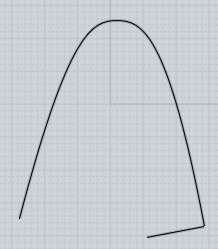 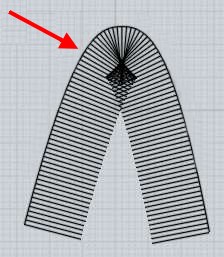
In the future I would like to make a variant of sweep that works by a pivoting method that would pivot profiles around a single rotation axis and just having it touch the rail instead of placing profiles perpendicular to the rail. But currently there is only the latter method for sweep.
There are a variety of different things you can use currently though.
If you remove one section of the profiles, the one that is the furthest away from the rail then there is barely enough room to sweep those pieces:


Then form the top and other areas by Construct > Planar rather than trying to use Sweep to form the top area:

And also use Construct > Planar to form the other sides as well:


Also some approaches using other tools instead of sweep have been described by others above.
- Michael |

